
OTW Multi-Viewport
Serial Multi-Viewport Customization Overview
120hz Serial Multi-Viewport (1x2), (2x1)
- Serial Multi-Viewport (SerialMVPort) generally refers to two 60Hz video outputs driving a single 120Hz display device.
- The legacy setup is that 60hz viewports are arranged in a side-by-side (2x1) or bottom-and-top (1x2) in a double-wide or double-tall Nova window and run off of a single graphics card.
120hz SerialMVPort (Customizable)
- In Rel2022.1+, SerialMVPort can now be further customized beyond the two fixed setups. The viewport frustrums in each render window can be positioned and offset independently from one another.
- The setup for this isn't much different than the default config, you simply need to make some edits to the cluster.cfg.
- An example file is provided below; but also there is a table highlighting some key required differences:
Serial Multi-Viewport Configuration
Serial Multi-Viewport Cluster Configuration
The required cluster.cfg setup doesn't differ much from the default serial multi-viewport layout, though the table below highlights key token differences.
Notes about Required Cluster tokens:
CHX_VIEWPORT_LAYOUT
- When using LAYOUT_2_CUSTOM, both viewports MUST be defined and valid.
- You also want to contain both viewports within the boundaries of the total framebuffer size, but keep in mind nova will not stop you from violating this!
CHX_VIEWPORT/2
- The custom viewports are drawn based on 4 parameters passed in via the CHx_VIEWPORT token.
- Follows format of <offset posX, offset posY, sizeX, sizeY>
- The 0,0 screenspace origin is the bottom left corner and "right and up" are considered positive directions.
Below is an example of the default config; meant for a 4k screen.
Custom Serial Multi-Viewport Usage
Custom Serial Multi-Viewport Runtime Operation
Runtime Scenario - Launch an OTW/OTW window with independently set FOVs on your deskside for testing
Setup the cluster.cfg for complete viewport customization → let's say it's two 600x600s in the corners of screen.
Cluster.cfg Setup Visual Example CHX_NAME OTW_2VIEWPORTS The example below is opposite corners on purpose to display that X & Y offset are both possible.
To align the Viewports, simply replace the Y-offset "120" with "0" for VIEWPORT2.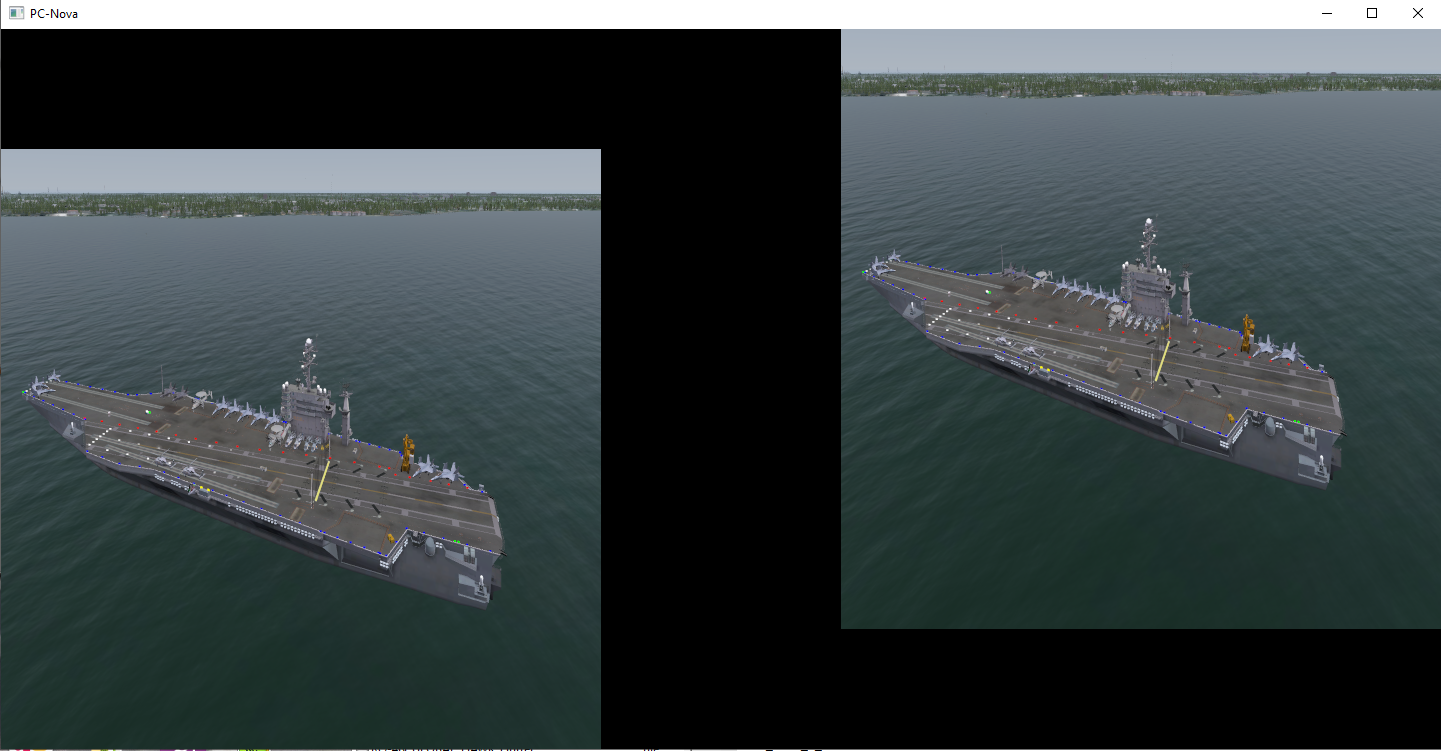
- Note: You can increase the values of the "OFFSET2" tokens for more difference between the FOVs, In this
example it's meant to be more subtle.
<--- These blank offsets can be anything; they're zero here to demonstrate with a simple example that they can be set independently.
CHX_IGMODE OTW CHX_VIEWPORT_LAYOUT LAYOUT_2_CUSTOM CHX_MVP_INDEPENDENT_FRUSTA TRUE CHX_WINSIZE_X 1440 CHX_WINSIZE_Y
720 CHX_VIEWPORT 0 0 600 600 CHX_VIEWPORT2 840 120 600 600
FOV_CHX_X_L 36.25 FOV_CHX_X_R 36.25 FOV_CHX_Y_T 16.76625 FOV_CHX_Y_B 28.54625 FOV2_CHX_X_L 0 FOV2_CHX_X_R 0 FOV2_CHX_Y_T 0 FOV2_CHX_Y_B 0 OFFSET_HOR_CHX 0 OFFSET_VERT_CHX 0 OFFSET_ROLL_CHX 0 OFFSET2_HOR_CHX 15.0 OFFSET2_VERT_CHX 15.0 OFFSET2_ROLL_CHX 0 - Note: You can increase the values of the "OFFSET2" tokens for more difference between the FOVs, In this
- Launch Nova using a cmd similar to the ex below:
TEXT
chad.lamfrom@clamfrom-desk /cygdrive/d/tree/database/data
$ D:/software/rel2023.1/built/ci/bin/optimized-x64/nova.exe -c versions/8.0/ren
derOTW.cfg -c versions/8.0/deskside.cfg DB_OVERLAY/DB_GLOBAL_DOD_V21/RELEASE/V21_1/global_dod_v21.cfg OTW_2VIEWPORTS########################################### Channel 26 - OTW SerialMVPort (Customizable independent viewports enabled)##########################################CH26_NAME OTW_2VIEWPORTSCH26_IGMODE OTWCH26_VIEWPORT_MODE MVMODE_SERIAL # Enable Serial MultiviewportCH26_VIEWPORT_LAYOUT LAYOUT_2_CUSTOM # Enables viewport layout customizationCH26_MVP_INDEPENDENT_FRUSTA TRUECH26_WINSIZE_X 3840 # Double window width to fit both frames in a pair.CH26_WINSIZE_Y 2160 # Double window width to fit both frames in a pair.CH26_VIEWPORT 0 720 1440 1440CH26_VIEWPORT2 2400 720 1440 1440CH26_SWAP_INTERVAL 1 # VSync to 60Hz video output(s) (no tearing)CH26_PIXEL_DEPTH 32CH26_ZBUFFER_DEPTH 32CH26_STENCIL_DEPTH 0CH26_MULTISAMPLE_MODE 8xFOV_CH26_X_L 22.5FOV_CH26_X_R 22.5FOV_CH26_Y_T 22.5FOV_CH26_Y_B 22.5FOV2_CH26_X_L 22.5FOV2_CH26_X_R 22.5FOV2_CH26_Y_T 22.5FOV2_CH26_Y_B 22.5OFFSET_HOR_CH26 0.0OFFSET_VERT_CH26 0.0OFFSET_ROLL_CH26 0.0OFFSET2_HOR_CH26 -45.0OFFSET2_VERT_CH26 0.0OFFSET2_ROLL_CH26 0.0