
Precipitation
Precipitation Overview
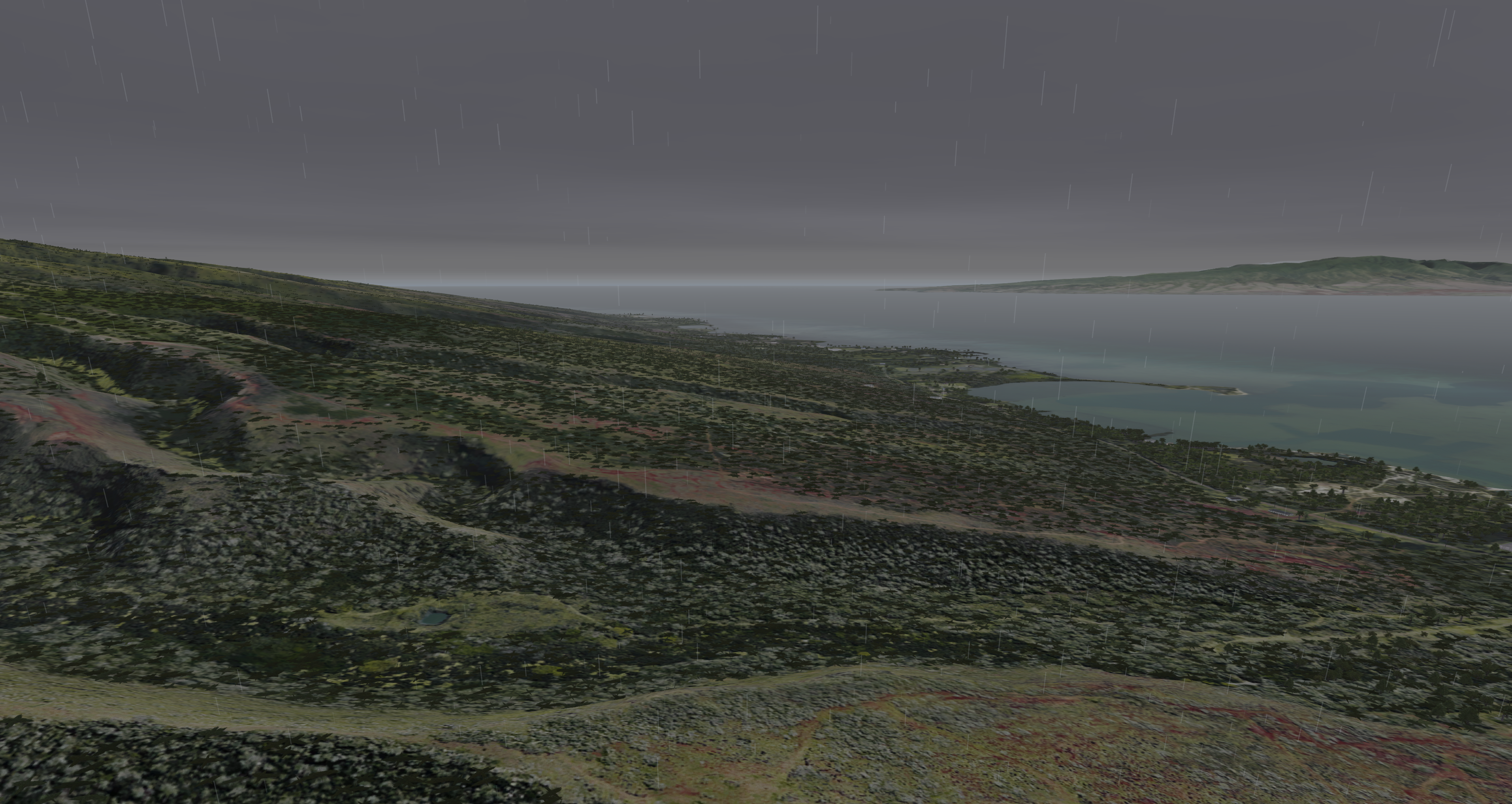
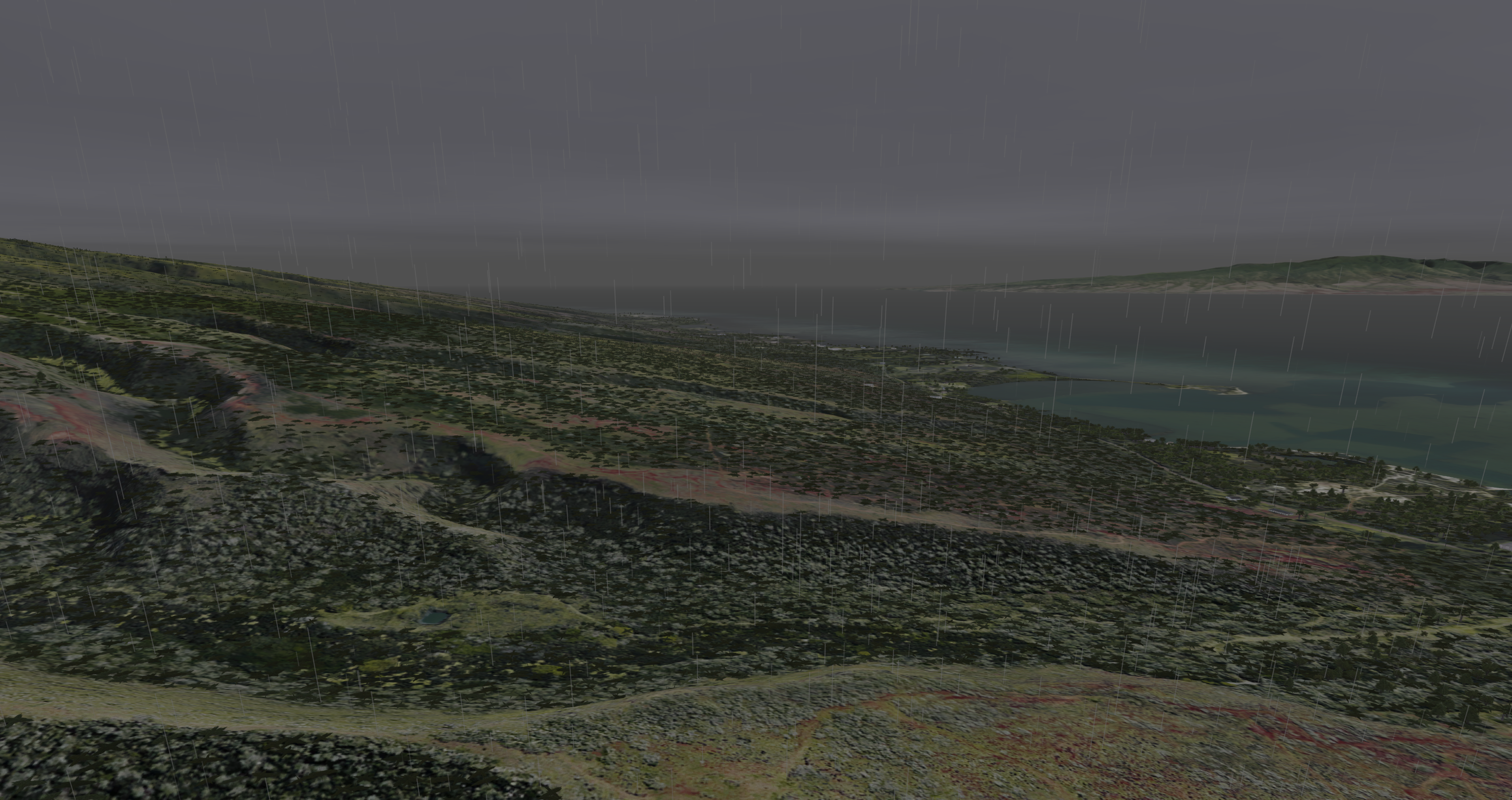
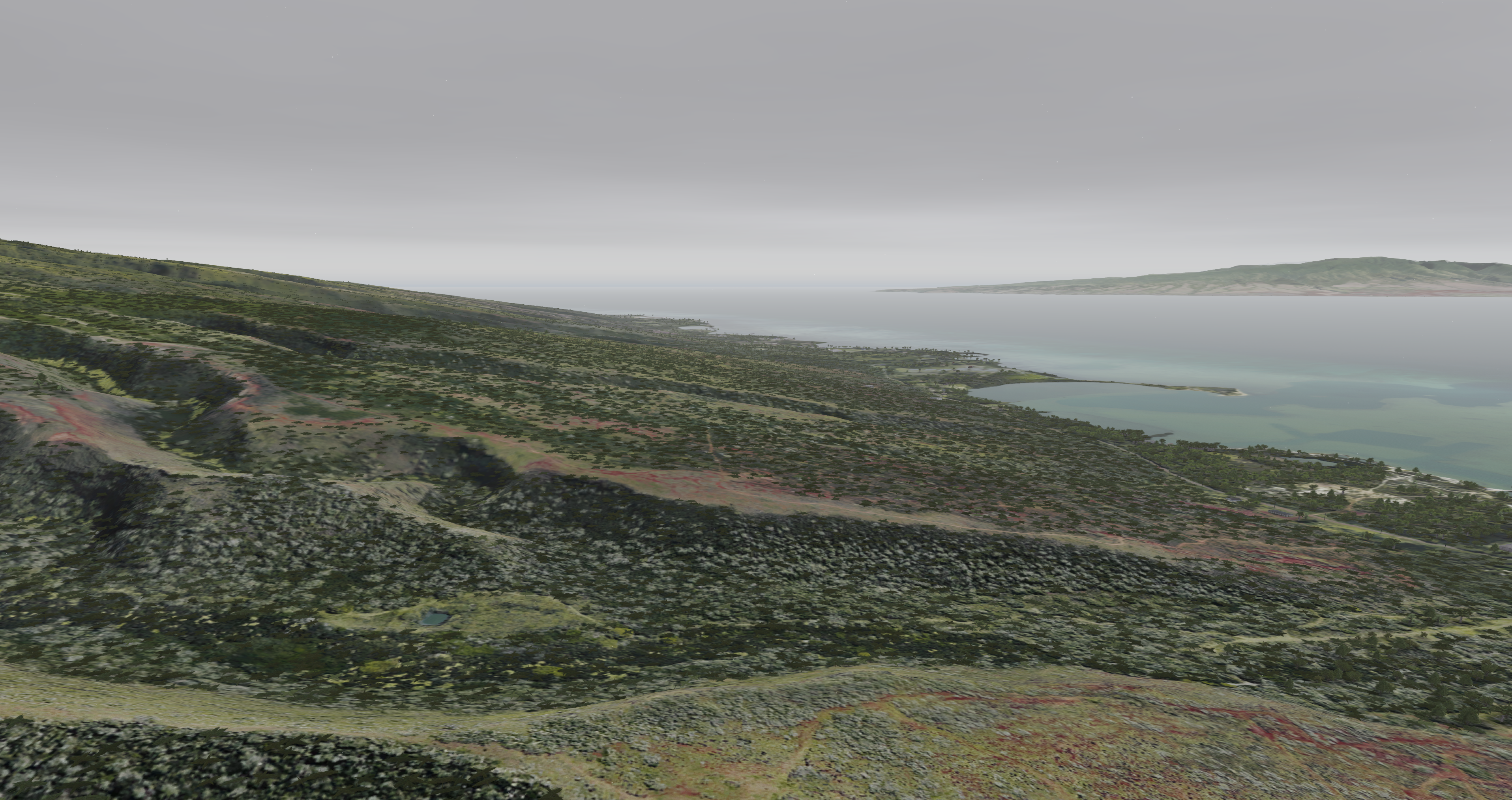
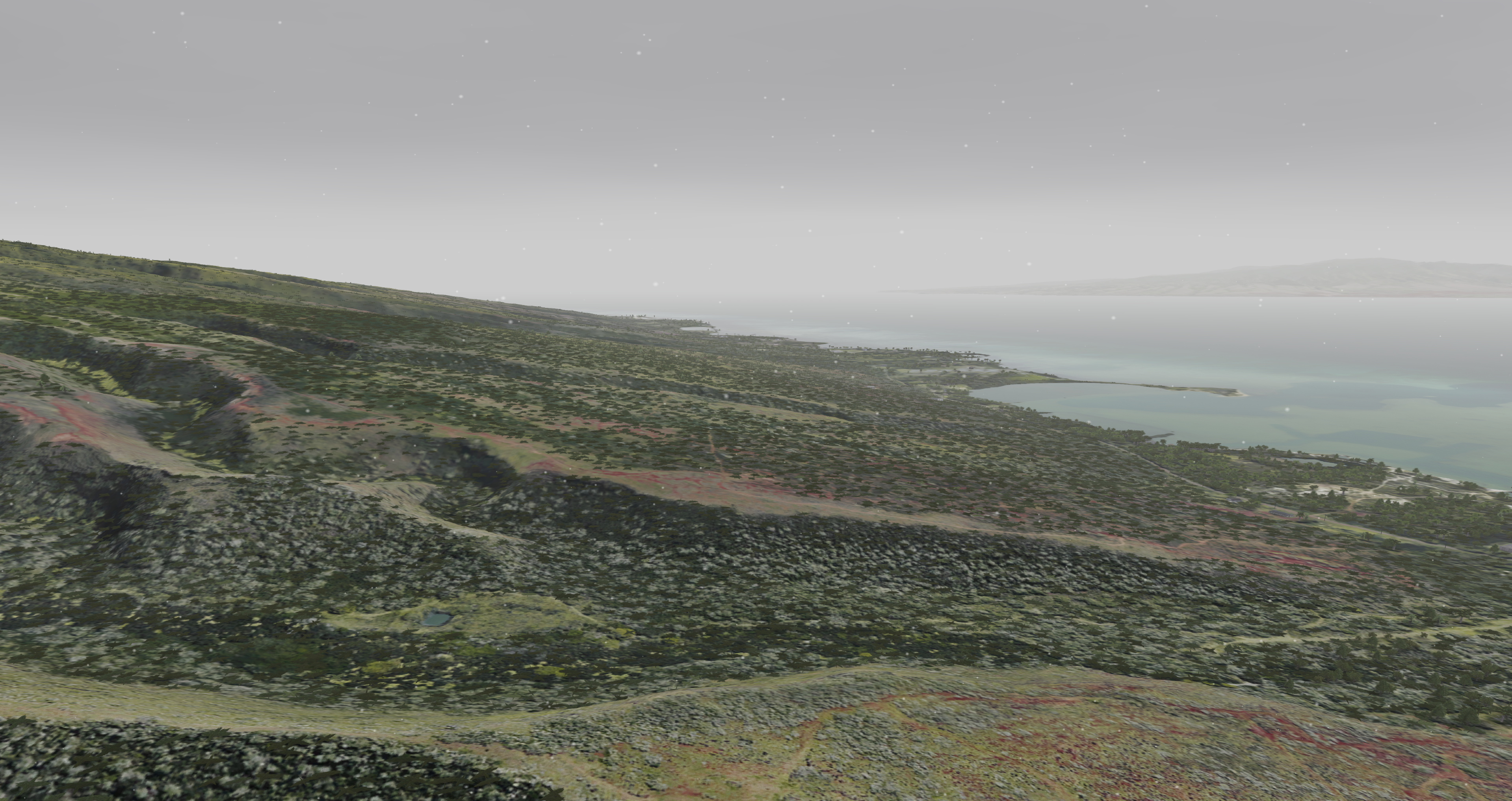
The purpose of the precipitation feature is to simulate some of the various weather conditions.
| Visual Examples | |
|---|---|
Rain set to value 1
| Rain set to value 5
|
Snow set to value 1
| Snow set to value 5
|
Precipitation Configuration
Precipitation Token Configuration
| Token Name | Type | Default Value | Accepted Values | Category | Description |
|---|---|---|---|---|---|
| AutoCloudCulturalIllum | BOOL | OFF | ON, OFF, 1, 0, TRUE, FALSE | Rendering Weather | |
| AutoCloudCulturalIllumCount | FLOAT | 25000 | -FLOAT_MAX to FLOAT_MAX, inclusive | Rendering Weather | |
| AutoCloudCulturalIllumFactor | FLOAT | 1 | -FLOAT_MAX to FLOAT_MAX, inclusive | Rendering Weather | |
| AutoCloudCulturalIllumViewCount | FLOAT | 15000 | -FLOAT_MAX to FLOAT_MAX, inclusive | Rendering Weather | |
| BlackSky | BOOL | OFF | ON, OFF, 1, 0, TRUE, FALSE | Rendering Weather | |
| CloudCulturalIllumDefault | FLOAT | 0 | -FLOAT_MAX to FLOAT_MAX, inclusive | Rendering Weather | |
| CloudMoonIlluminationFactor | FLOAT | 1 | 0 to 1, inclusive | Rendering Weather | Factor to control moon cloud/fog illumination in OTW/CCD |
| DisableCloudSort | BOOL | OFF | ON, OFF, 1, 0, TRUE, FALSE | Rendering Weather | |
| InsideCloudVisibilityFactor | FLOAT | 1 | Greater than 0 Less than or equal to FLOAT_MAX ( 0 < x <= FLOAT_MAX ) | Rendering Weather | |
| LayeredHazeColors | BOOL | ON | ON, OFF, 1, 0, TRUE, FALSE | Rendering Weather | Sets whether layered haze colors are used If: 1) OTW or RADAR 2) Not Planter 3) HDRLighting is OFF or ON. Ignored and implicitly forced ON for sensor types where HDRLighting ADVANCED is active. Ignored and implicitly forced OFF if: HDRLighting is OFF or ON, and 1) Sensor type != OTW or RADAR or 2) Is Planter. |
| LayeredHazeDensityInitValue | FLOAT | 0.66 | -FLOAT_MAX to FLOAT_MAX, inclusive | Rendering Weather | |
| LightInsideCloudRange | FLOAT | 100 | Greater than 0 Less than or equal to FLOAT_MAX ( 0 < x <= FLOAT_MAX ) | Rendering Weather | |
| LightningIntensityFactor | FLOAT | 1 | -FLOAT_MAX to FLOAT_MAX, inclusive | Rendering Weather | |
| RainColorFactor | FLOAT | 1 | -FLOAT_MAX to FLOAT_MAX, inclusive | Rendering Weather |
Precipitation Data Configuration
None.
Precipitation Usage
Precipitation ICD Interface
Precipitation is broken up into two main ICD parts. The particle effect is controlled by rain or snow while the scene illumination and visibility effect is controlled by the inten_rain variable. By default the scene illumination and visibility effect is set to
Nova Variable | Description |
|---|---|
| ios2ig.dat.rain | Severity level of the rain 1: Least Severe - 5: Most Severe |
| ios2ig.dat.inten_rain | 0.0 - 1.0 |
| ios2ig.dat.snow | Severity level of the snow 1: Least Severe - 5: Most Severe |
Precipitation Runtime Operation
Runtime Scenario - Enabling Rain / Snow
If using AeHost:
- Locate the Precipitation section.
- To enable rain:
- Locate Rain Enable, Severity and click its checkbox; change the value to 3.
- To enable snow:
- Location Snow Enable, Severity and click its checkbox; change the value to 3.
If setting values directly in Spy:
- Set ios2ig.dat.rain to 3.
- Set ios2ig.dat.inten_rain to 1.
or - Set ios2ig.dat.snow to 3.
- Set ios2ig.dat.inten_rain to 1.
Precipitation CIGI Packets
Component Control Packet for Weather Control
Supports portions of the standard CigiWeatherCtrlV3 packet with some minor modifications. Most basic controls for environment and defaults are performed through standard CigiAtmosCtrl packet.
| CIGI Class | CigiWeatherCtrlV3 | ||
|---|---|---|---|
| Packet ID | 12 | ||
| Packet Size (bytes) | 56 | ||
| Parameter | Type | Description | Range |
| Layer ID | unsigned int8 | This parameter specifies the weather layer to which the data in this packet are applied. This parameter also determines the type of aerosol contained within the layer.
0 = Ground Fog 1 = Cloud Layer 1 2 = Cloud Layer 2 3 = Cloud Layer 3 4 = Rain 5 = Snow 6 = Sleet 7 = Hail 8 = Sand 9 = Dust Aechelon Extensions 10 = Lightning 11 = Sea State 12 = Haze 13 = Windshield Wipes 14 = Tide Level 15 = Patchy Fog 16 = Wet Runway 17 = Sea Current 18 = Alpenglow 19 = Wind Layer 1 20 = Wind Layer 2 21 = Wind Layer 3 22 = Wind Layer 4 | 0 - 255 |
| Layer ID | Weather Effect | SpyClient Mapping | Supported Fields | Description |
|---|---|---|---|---|
| 0 | Ground Fog | ios2ig.dat.fog | Weather Enable | Off / On Flag (0, 1) |
| ios2ig.dat.fog_layer_floor | Base Elevation | Top altitude of full fog where visibility is equal to Visibility Range. (The fog base always extends to the ground - ownship cannot punch below layer). | ||
| ios2ig.dat.fog_layer_ceiling | Thickness (Summed with base elevation) | Thickness of transition band between Base Elevation (full fog) and no fog. | ||
| ios2ig.dat.fog_layer_range | Visibility Range | Visibility range within ground fog. | ||
| 1 | Cloud Layer 1 | N/A | Weather Enable | Off / On Flag (0, 1) |
| ios2ig.dat.cloud_layer1 | Cloud Type | See Cloud Types. | ||
| 7th bit of ios2ig.dat.cloud_layer1 | Scud Enable | Off / On | ||
| ios2ig.dat.cloud_thick1 | Transition | Transition region for scud. | ||
| ios2ig.dat.cloud_bottom1 | Base Elevation | Lowest Cloud level (meters). | ||
ios2ig.dat.cloud_height1 | Top Height (Summed with thickness) | For types 3 and 9 - 12: Top height of cloud layer (Base Elevation + Thickness). Thickness ignored for type 10. All other types: Transition layer thickness - these clouds are 2D. | ||
| ios2ig.dat.cloud_layer_color1 | Severity | Color Enumeration 0: Default 1: Darkest - 4: Lightest | ||
| ios2ig.dat.cloud_layer_density1 | Coverage (Types 9 - 12 only) | Density: 0 - 100 (Less Dense - More Dense). | ||
| ios2ig.dat.cloud_layer_softness1 | Aerosol (Types 9 - 12 only) | Softness: -127 - 127 (Sharper Edge - Softer Edge). 0 is default. | ||
| 2 | Cloud Layer 2 | N/A | Weather Enable | Off / On Flag (0, 1) |
| ios2ig.dat.cloud_layer2 | Cloud Type | See Cloud Types. | ||
| 7th bit of ios2ig.dat.cloud_layer2 | Scud Enable | Off / On | ||
| ios2ig.dat.cloud_thick2 | Transition | Transition region for scud. | ||
| ios2ig.dat.cloud_bottom2 | Base Elevation | Lowest Cloud level (meters). | ||
ios2ig.dat.cloud_height2 | Top Height (Summed with thickness) | For types 3 and 9 - 12: Top height of cloud layer (Base Elevation + Thickness). Thickness ignored for type 10. All other types: Transition layer thickness - these clouds are 2D. | ||
| ios2ig.dat.cloud_layer_color2 | Severity | Color Enumeration 0: Default 1: Darkest - 4: Lightest | ||
| ios2ig.dat.cloud_layer_density2 | Coverage (Types 9 - 12 only) | Density: 0 - 100 (Less Dense - More Dense) | ||
| ios2ig.dat.cloud_layer_softness2 | Aerosol (Types 9 - 12 only) | Softness: -127 - 127 (Sharper Edge - Softer Edge) 0 is default | ||
| 3 | Cloud Layer 3 | N/A | Weather Enable | Off / On Flag (0, 1) |
| ios2ig.dat.cloud_layer_color3 | Severity | Color Enumeration 0: Default 1: Darkest - 4: Lightest | ||
| ios2ig.dat.cloud_layer_density3 | Coverage (Types 9 - 12 only) | Density: 0 - 100 (Less Dense - More Dense) | ||
| ios2ig.dat.cloud_layer_softness3 | Aerosol (Types 9 - 12 only) | Softness: -127 - 127 (Sharper Edge - Softer Edge). 0 is default. | ||
| 4 | Rain | N/A | Weather Enable | Off / On Flag (0, 1) |
ios2ig.dat.rain ios2ig.dat.inten_rain | Severity | Rain Severity 1: Less Severe - 5: More Severe | ||
| 5 | Snow | N/A | Weather Enable | Off / On Flag (0, 1) |
| ios2ig.dat.snow | Severity | Snow Severity 1: Less Severe - 5: More Severe | ||
| 10 | Lightning (Aechelon Extension) | ios2ig.dat.lightning | Weather Enable | Off / On Flag (0, 1) |
| Severity | 1: Less Severe - 3: More Severe | |||
| 11 | Sea State (Aechelon Extension) | N/A | Weather Enable | Off / On Flag (0, 1) |
| ios2ig.dat.sea_state.sea_state | Severity | Sea State 1: Calm - 5: Not Calm | ||
| ios2ig.dat.sea_state.sea_roughness | Thickness | Sea Roughness 1: Less Rough - 5: More Rough | ||
| ios2ig.dat.sea_state.sea_wind_speed | Horizontal Wind Speed | Wind speed for waves (knots). | ||
| ios2ig.dat.sea_state.sea_wind_dir | Wind Direction | Wind direction for waves (degrees). | ||
| 12 | Haze (Aechelon Extension) | N/A | Weather Enable | Off / On Flag (0, 1) |
ios2ig.dat.visib_general ios2ig.dat.visib_fog ios2ig.dat.fog_range | Visibility Range | Range (meters). | ||
ios2ig.dat.layered_haze_intensity | Coverage | Intensity of layered haze effect (0.0 - 1.0). | ||
ios2ig.dat.haze_tint | Thickness | De-saturate blue tint of haze effect (0.0 - 1.0). 0.0 is default value. | ||
| 13 | Windshield Wipers (Aechelon Extension) | N/A | Weather Enable | Thickness = (0.0 - 1.0) Speed |
ios2ig.dat.windshield_wipers | Thickness | Speed 0.0: Slower - 1.0: Faster | ||
| 14 | Tide Level (Aechelon Extension) | ios2ig.dat.sea_state.tide_level | Thickness | Tide (feet). |
| 15 | Patchy Fog (Aechelon Extension) | N/A | Weather Enable | Off / On Flag (0, 1) |
ios2ig.dat.fog | Coverage | Coverage Type | ||
ios2ig.dat.fog_layer_floor | Base Elevation | Top altitude of full fog where visibility is equal to Visibility Range (the fog base always extends to the ground, 0 MSL) | ||
ios2ig.dat.fog_layer_ceiling | Thickness (Summed with base elevation) | Thickness of transition band between Base Elevation (full fog) and no fog | ||
ios2ig.dat.fog_layer_range | Visibility Range | Range. | ||
ios2ig.dat.varying_fog | Transition | Variance 0.0 - 1.0 | ||
| 16 | Wet Runway (Aechelon Extension) | N/A | Weather Enable | Off / On Flag (0, 1) |
ios2ig.dat.wet_runway | Severity | Effect enumeration 0: Auto 1: Clear 2: Rain 3: Snow 4: Ice 5: Patchy Rain 6: Patchy Snow 7: Patchy Ice 8: Sand | ||
| 17 | Sea Current (Aechelon Extension) | N/A | Weather Enable | Off / On Flag (0, 1) |
ios2ig.dat.sea_state.sea_current_dir | Wind Direction | Wind direction for sea targets (degrees). | ||
ios2ig.dat.sea_state.sea_current_speed | Horizontal Wind Speed | Wind speed for sea current (knots). | ||
ios2ig.dat.sea_state.sea_current_amplitude | Base Elevation | Wave amplitude in meters. | ||
ios2ig.dat.sea_state.sea_current_period | Thickness | Wave period in meters. | ||
| 18 | Alpenglow (Aechelon Extension) | N/A | Weather Enable | Off / On Flag (0, 1) |
ios2ig.dat.alpenglow | Thickness | Alpenglow effect intensity 0.0 - 1.0 | ||
| 19 | Wind Layer 1 (Aechelon Extension) | N/A | Weather Enable | Off / On Flag (0, 1) Note that the Atmosphere Control packet's wind settings set all wind layers; to set them individually, you must send this packet after the Atmosphere Control packet |
h2ig.dat.wind_dir[0] | Wind Direction | Wind direction (degrees). | ||
h2ig.dat.wind_veloc[0] | Horizontal Wind Speed | Wind speed (knots). | ||
h2ig.dat.wind_layer_hgt[0] | Base Elevation | Wave height in meters. | ||
| 20 | Wind Layer 2 (Aechelon Extension) | N/A | Weather Enable | Off / On Flag (0, 1) Note that the Atmosphere Control packet's wind settings set all wind layers; to set them individually, you must send this packet after the Atmosphere Control packet |
h2ig.dat.wind_dir[1] | Wind Direction | Wind direction (degrees). | ||
h2ig.dat.wind_veloc[1] | Horizontal Wind Speed | Wind speed (knots). | ||
h2ig.dat.wind_layer_hgt[1] | Base Elevation | Wave height in meters. | ||
| 21 | Wind Layer 3 (Aechelon Extension) | N/A | Weather Enable | Off / On Flag (0, 1) Note that the Atmosphere Control packet's wind settings set all wind layers; to set them individually, you must send this packet after the Atmosphere Control packet |
h2ig.dat.wind_dir[2] | Wind Direction | Wind direction (degrees). | ||
h2ig.dat.wind_veloc[2] | Horizontal Wind Speed | Wind speed (knots). | ||
h2ig.dat.wind_layer_hgt[2] | Base Elevation | Wave height in meters. | ||
| 22 | Wind Layer 4 (Aechelon Extension) | N/A | Weather Enable | Off / On Flag (0, 1) Note that the Atmosphere Control packet's wind settings set all wind layers; to set them individually, you must send this packet after the Atmosphere Control packet |
h2ig.dat.wind_dir[3] | Wind Direction | Wind direction (degrees). | ||
h2ig.dat.wind_veloc[3] | Horizontal Wind Speed | Wind speed (knots). | ||
h2ig.dat.wind_layer_hgt[3] | Base Elevation | Wave height in meters. |
Component Control Packet for 3D Clouds
| Structure Type | Cloud3DHV | |||
|---|---|---|---|---|
| Packet ID | 241 | |||
| Packet Size (bytes) | 54 | |||
| SpyClient Lookup | host2pcnova → h2ig.dat.fx_data.cloud3D | |||
| Parameter | Type | Description | Range | |
| Cloud3D_Active | char | Enable or disable 3D cloud. | ON, OFF | |
| Type_Cloud3D | char | See 3D Cloud Types. | 1 - MAX_3DCLOUD_TYPE | |
| Evol_Cloud3D | char | See 3D Cloud Evolution Types. | 1 - MAX_3DCLOUD_TYPE | |
| Rain_Cloud3D | char | Enable or disable rain shaft. | ON, OFF | |
Lightning_Cloud3D | char | Enables cloud to emit lightning if lightning mode is enabled in the weather structure. | -1 = OFF 0 = AUT0 1 = ON | |
| Siz_Cloud3D | char | Size (radius) in meters. | 0.0 - MAXFLOAT | |
| Scud_Cloud3D | float | Scud control. | 0.0 - 1.0 | |
| Height_Cloud3D | float | Vertical size (radius) in meters; if 0.0, same as siz_cloud3D. | 0.0 - MAXFLOAT | |
Coord_Cloud3D | lat | double | Cloud center latitude. | Valid latitude |
| lon | double | Cloud center longitude. | Valid longitude | |
| alt | double | Cloud altitude in feet. | 0.0 - MAXDOUBLE | |
Precipitation FX Tuning
FX Tuning for Precipitation
| Token Name | Default Value | Accepted Values | Description | Token Source File |
|---|---|---|---|---|
| SNOW_SPEED | 18.0 | Scales snow velocity. | Precipitation.fx | |
| RAIN_SPEED | 70.0 | Scales rain velocity. | ||
| RAIN_COLOR_SCALE | -0.02 | Controls rain color. | ||
| RAIN_COLOR_BIAS | 1.3 | Controls rain color. | ||
| RAIN_ALPHA_SCALE | 0.35 | Controls rain transparency. | ||
| RAIN_ALPHA_BIAS | 0.15 | Controls rain transparency. | ||
| NUM_PARTICLES | 10000 | Maximum number of precipitation particles. | ||
| MIN_PARTICLES | 4000 | Minimum number of precipitation particles. | ||
| GLOBAL_SPEED_FACTOR | 2.4 | Scales precipitation velocity. | ||
| SNOW_ALPHA | 0.6 | Controls snow transparency. | ||
| MIN_SNOW_SIZE | 3.0 | Smallest snowflake size. | ||
| MAX_SNOW_SIZE | 25.0 | Largest snowflake size. | ||
| CUBE_WIDTH | 400.0 | Specifies how large of a region around the ownship has precipitation. | ||
| FADE_BAND_THICKNESS | 75.0 | Controls the size of the fade band. | ||
| RAIN_LENGTH | 3.0f | Controls the length of a raindrop. | ||
| RANDOM_SEED | 17835510 | Seeds the random number generator used to place precipitation. | ||
| SNOW_TEXTURE | SYSTX_STAR | Name of the snow texture. | ||
| RAIN_WIND_FACTOR | 2.0 | Controls how wind affects rain. | ||
| SNOW_WIND_FACTOR | 1.0 | Controls how wind affects snow. | ||
| OWNSHIP_VELOCITY_FILTER | 0.1 | At 1.0, there is no filtering of velocity across frames. Smaller values mean more smoothing / filtering. |