
Moon Control
Moon Control Overview
The purpose of the moon control feature is to allow manual control of the Moon object in Nova. Utilizing this feature will override the moon position and phase (from the Celestial Sphere Control).
| Visual Examples | |
|---|---|
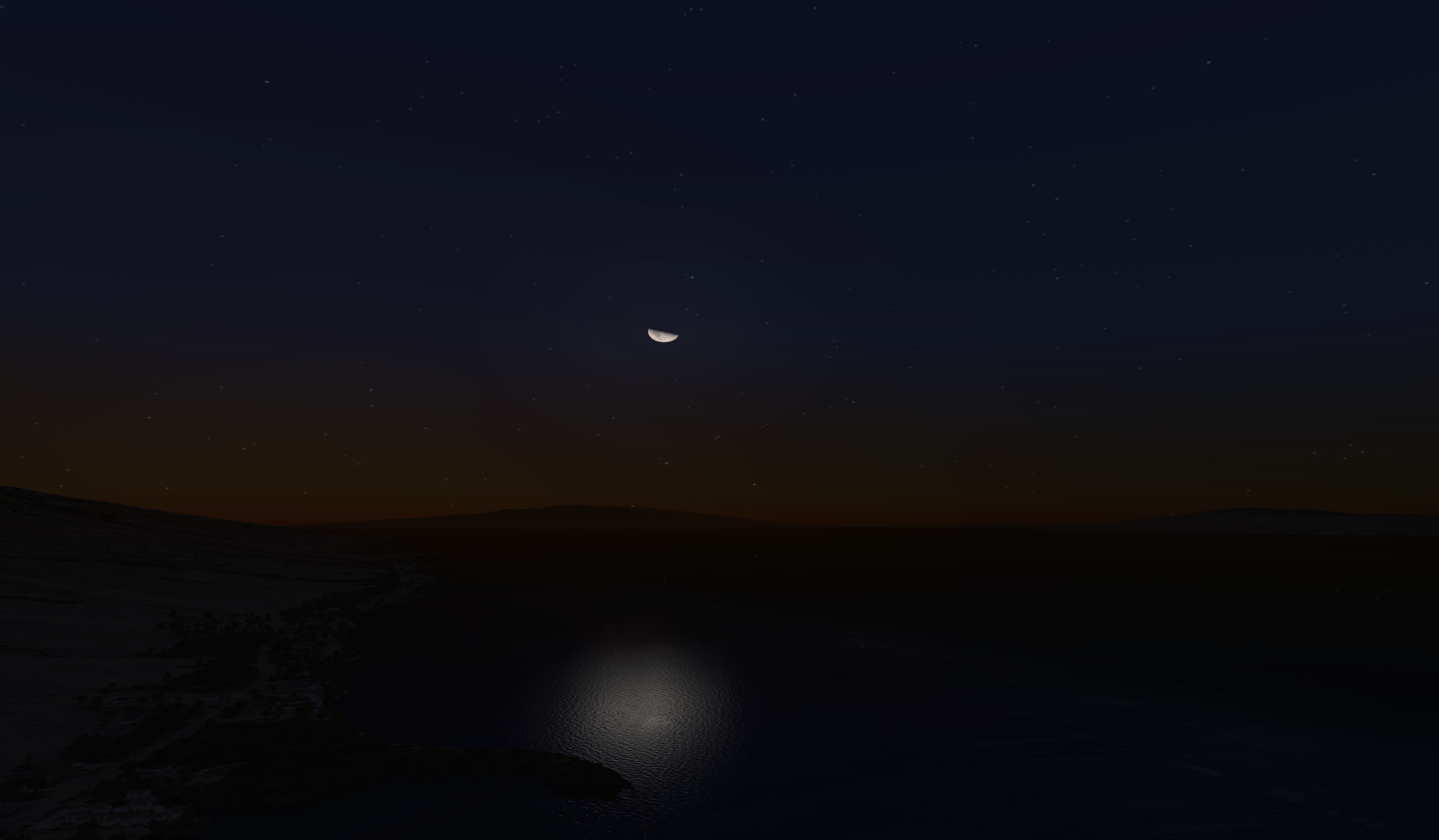
The moon being casted over a body of water.
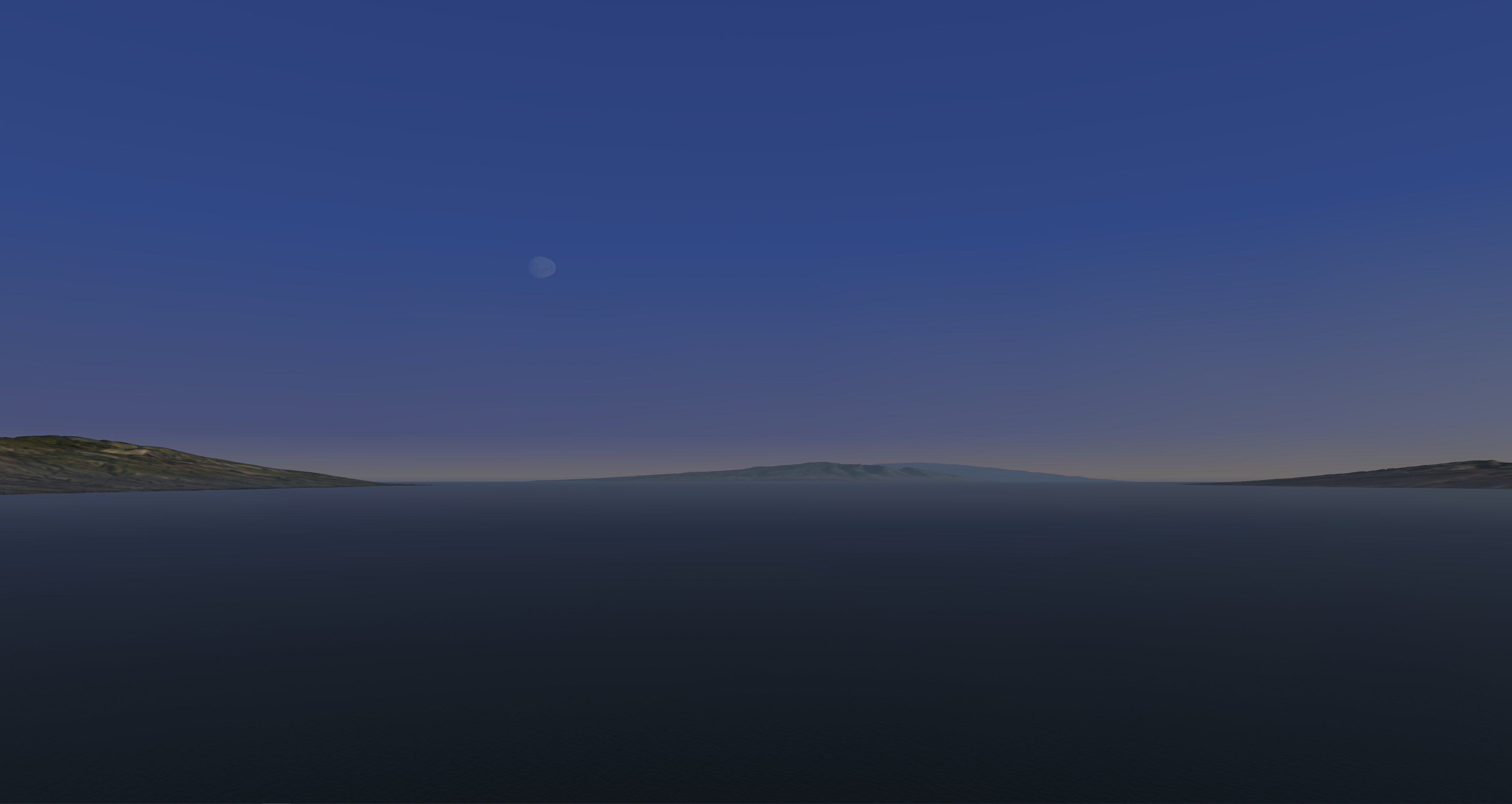
| The moon appearing in daytime.
|
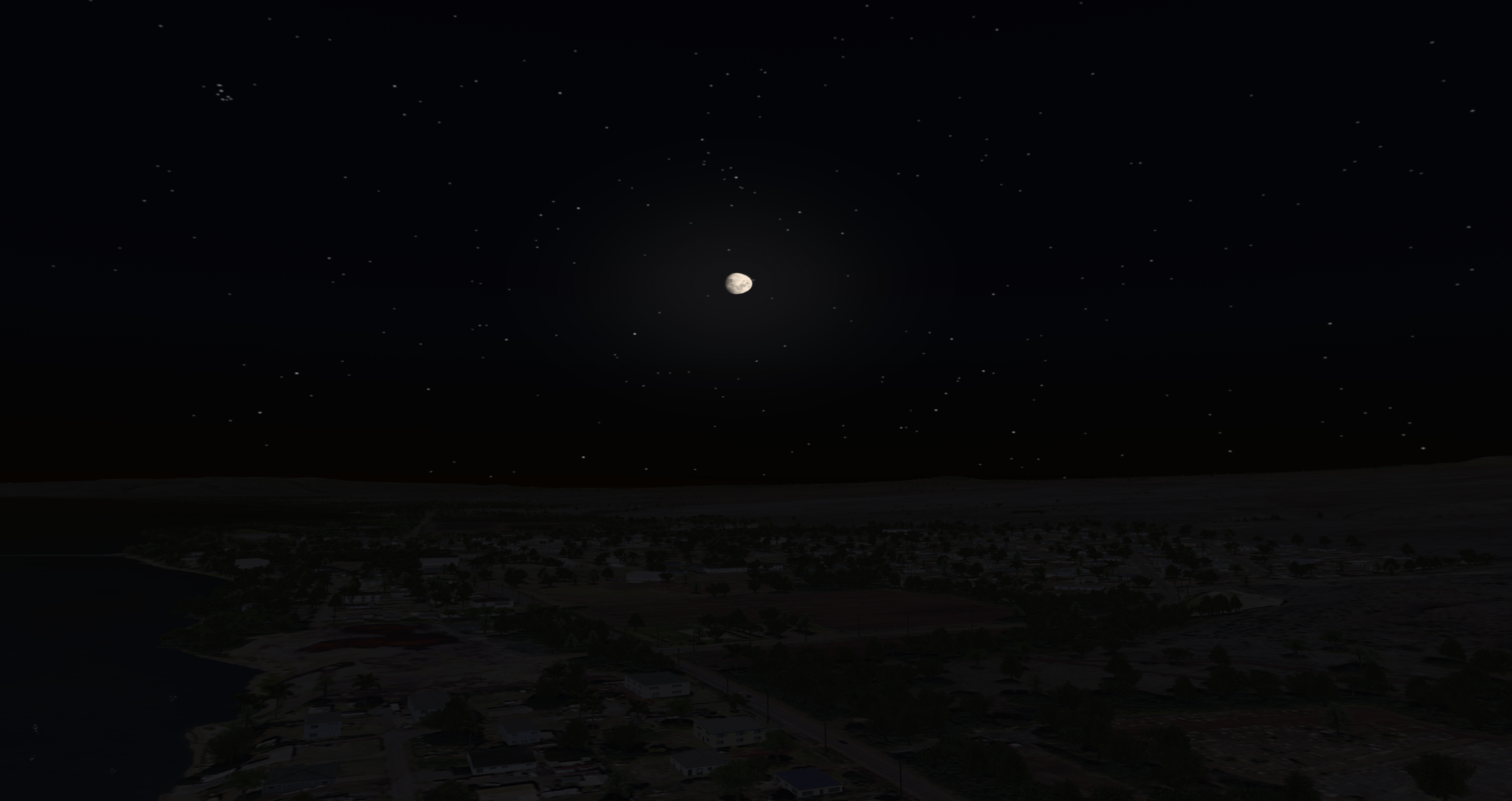
The moon over a town.
| |
Moon Control Configuration
No special data configuration is needed to control the moon.
Moon Control Usage
Moon Control ICD Interface
| Nova Variable | Description |
|---|---|
tofday.celestial_data.moon.position[0] | Moon heading in degrees |
tofday.celestial_data.moon.position[1] | Moon elevation in degrees |
tofday.celestial_data.moon.position[2] | Moon roll in degrees |
tofday.celestial_data.moon.magnitude | Moon phase as percentage. 0.0 is new moon and 1.0 is full moon. |
Moon Control Runtime Operation
Runtime Scenario - Set and see a Full Moon
Scenario:
Visual Example 
Setting the time:
- Get the variable ios2ig.dat.tofday.hours and add it to Spy.
- Locate this variable's request type column and click "SPY"; it will change to "OVRD".
- Locate this variable's value and change it to 23.
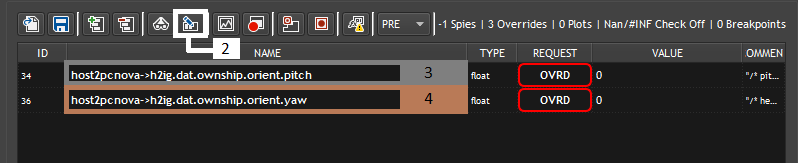
NOTE: Variables will be addressed without the "h2ig.dat.ownship." for simplicity after step 1.
Setting the position (for viewing):
- Get the following variables and add them to Spy:
- h2ig.dat.ownship.orient.pitch
- h2ig.dat.ownship.orient.yaw
- Select all of the variables and click "Override all selected variables" to override all of the variables at once.
- Locate orient.pitch and change the value to 20.
- Locate orient.yaw and change the value to 270.
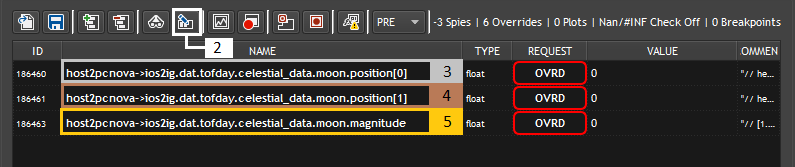
NOTE: Variables will be addressed without the "ios2ig.dat.tofday.celestial_data.moon." for simplicity after step 1.
Manually controlling the moon:
- Get the following variables and add them to Spy:
- ios2ig.dat.tofday.celestial_data.moon.position[0]
- ios2ig.dat.tofday.celestial_data.moon.position[1]
- ios2ig.dat.tofday.celestial_data.moon.magnitude
- Select all of the variables and click "Override all selected variables" to override all of the variables at once.
- Locate position[0] and change its value to 270.
- Locate position[1] and change its value to 20.
- Locate magnitude and change its value to 1.0 or -1.0 (this will display a full moon).
- Get the variable ios2ig.dat.tofday.hours and add it to Spy.
Moon Control (Manual) AeHost Usage
AeHost Scenario - Set and Enable the Moon (full)
Scenario:
Visual Example 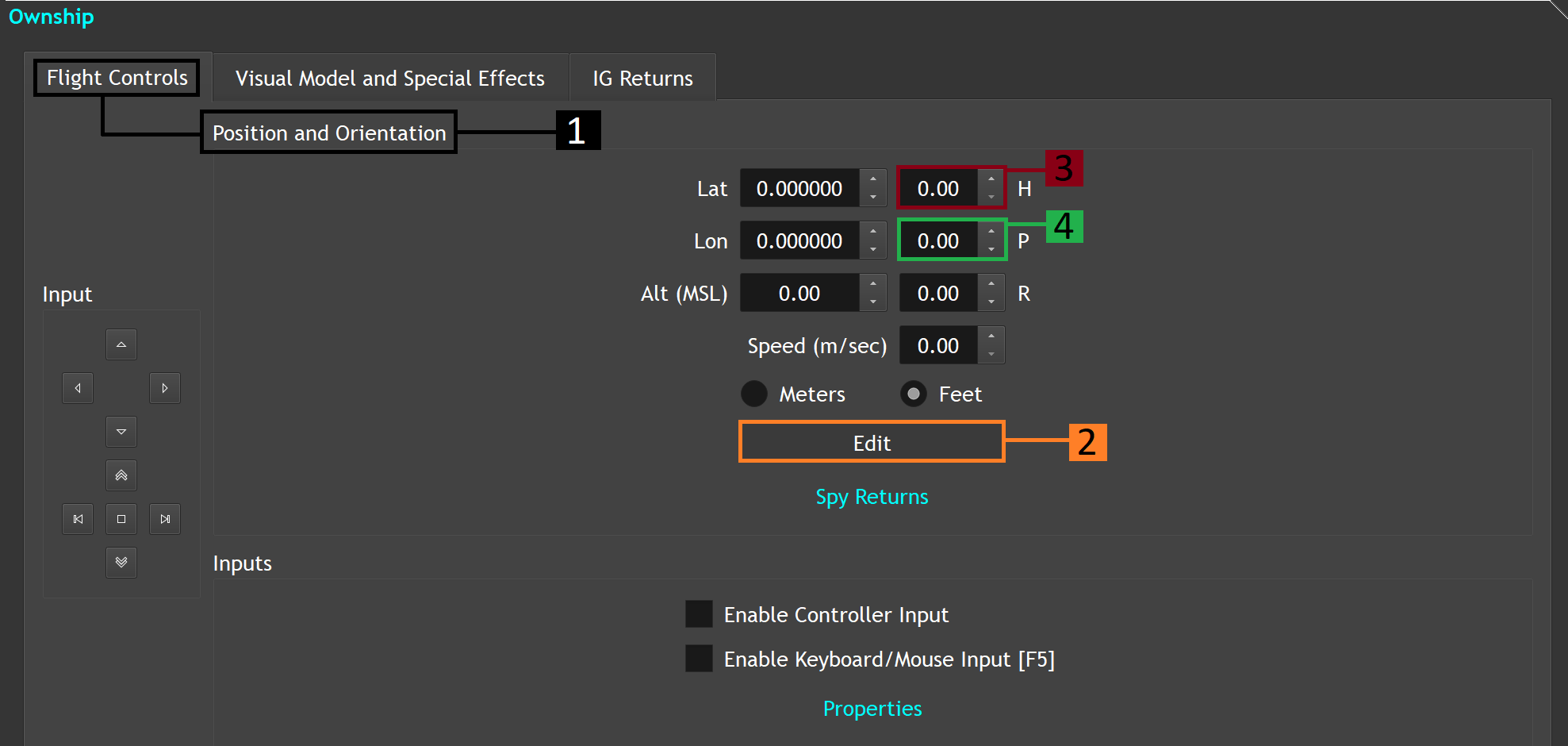
Setting the Ownship to see the moon:
- Locate "Position and Orientation".
- Locate and click the "Edit" button.
- Locate the heading label and change its value to 270.
- Locate the pitch label and change its value to 20.
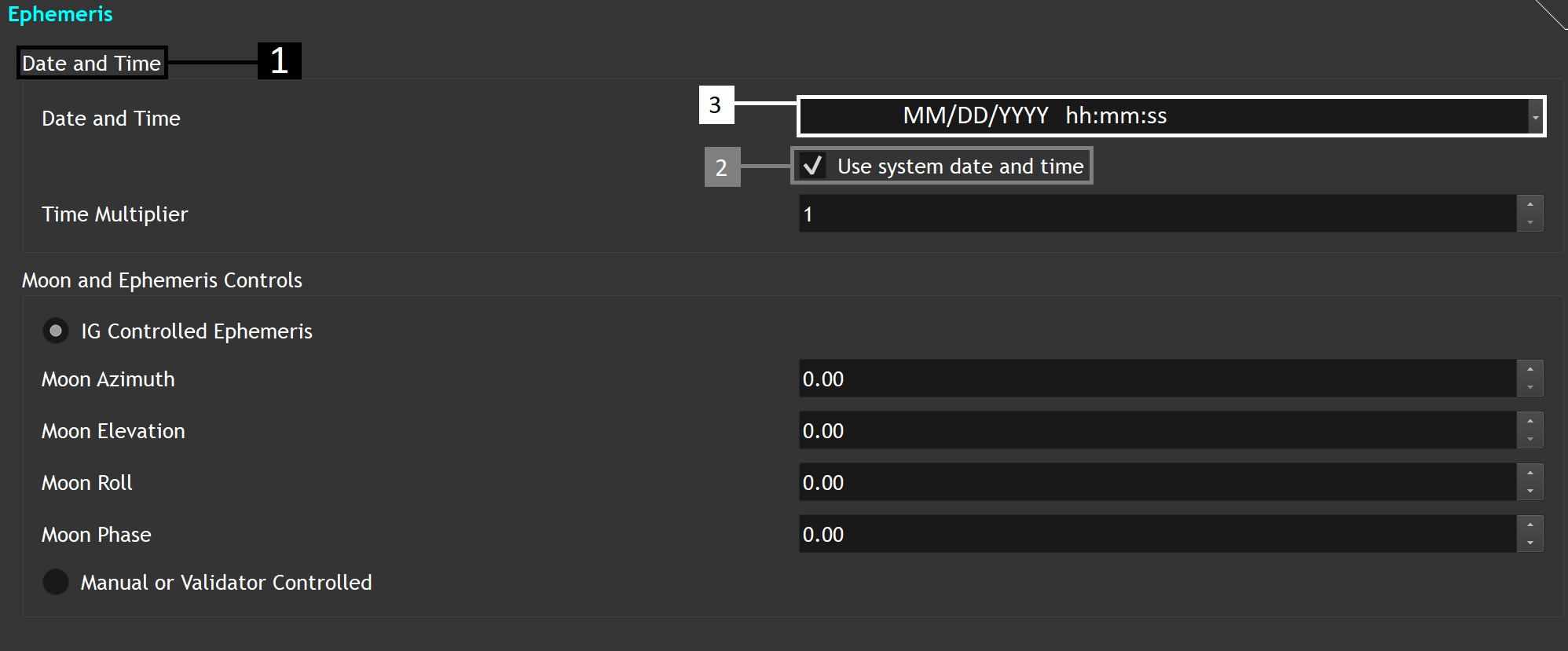
Setting the time:
- Locate the "Date and Time" section.
- Uncheck "Use system date and time".
- Change the time to 20:30:00
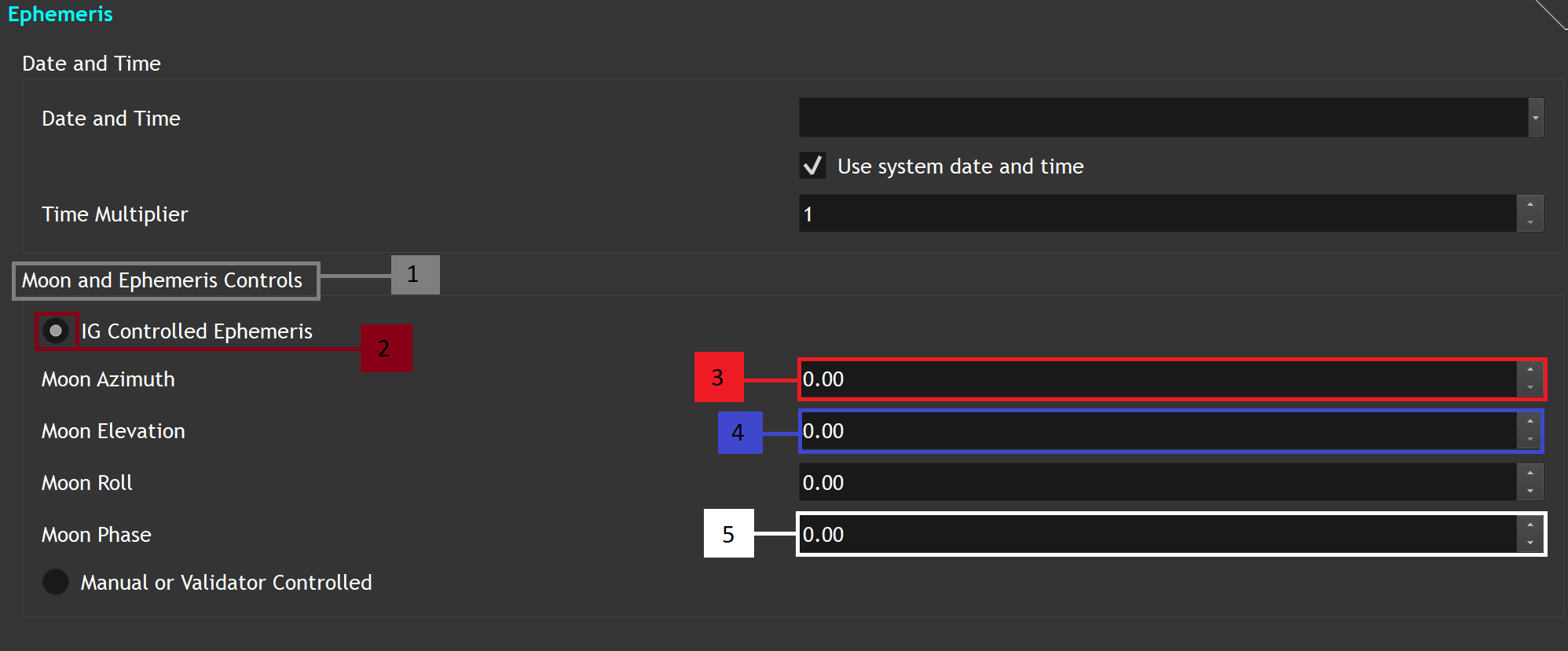
Setting up the moon:
- Locate the "Moon and Ephemeris Controls" section.
- If not already selected, select "IG Controlled Ephemeris".
- Locate the Moon Azimuth line and change the value to 270.
- Locate the Moon Elevation line and change the value to 20.
- Locate the Moon Phase line and change the value to 1.0.
- Locate "Position and Orientation".
Moon Control CIGI Packets
Celestial Sphere Control Packet to Control Time of Day and Ephemeris
| CIGI Class | CigiCelestialCtrlV3 | ||
|---|---|---|---|
| CIGI Base Class | CigiBaseEnvCtrl | ||
| Packet ID | 9 | ||
| Packet Size (bytes) | 16 | ||
| SpyClient Lookup | host2pcnova → ios2ig.dat.tofday | ||
| Parameter | Type | Description | Range |
| hour | char | Specifies the current hour of the day within the simulation. | 0 - 23 |
| minute | char | Specifies the current minutes of the day within the simulation. | 0 - 59 |
| ephemeris enable | 1-bit field | Controls whether the time of day is static or continuous. 0 = Disable (Static time of day) 1 = Enable (Continuous time of day) | 0 - 1 |
| date | unsigned int | Specifies current date within the simulation. format: MMDDYYYY | 0 - MAX UINT |
Component Control Packet for Manual Moon Control
| Component Class CelestialSphereV3 (11) | |||
|---|---|---|---|
| Comp ID | Field | ICD Mapping | Control Parameter |
| 1 | Magnitude | celestial_data.moon.magnitude | CompData (0) as float |
Azimuth | celestial_data.moon.position[0] | CompData (1) as float | |
Elevation | celestial_data.moon.position[1] | CompData (2) as float | |
Roll | celestial_data.moon.position[2] | CompData (3) as float | |
Moon Control FX Tuning
FX Tuning for Moon Control
| Token Name | Default Value | Accepted Values | Description | Token Source File |
|---|---|---|---|---|
| SKY_NOISE_ENABLED | TRUE | Sky noise enabled flag. | Sky.fx | |
| SKY_NOISE_TEXTURE_COORD_SCALE | 0.004 | Sky noise shader parameter. | ||
| SKY_NOISE_TEXTURE_INTENSITY | 0.033 | Sky noise shader parameter. | ||
| GLOW_NOISE_TEXTURE_COORD_SCALE | 2.0 | Glow noise shader parameter. | ||
| GLOW_NOISE_TEXTURE_INTENSITY | 0.582 | Glow noise shader parameter. | ||
| STARS_REFLECTION_GAIN | 0.5 | Stars / Planets reflection gain. | ||
| SKY_OBJECTS_SCALE | 6.0 | Sun / Moon scalar. | ||
| SKY_RADIUS | 10000.0 | Sky radius. | ||
| HORIZON_SKY_SCALE_FIXED | 0.33 | Controls the sky and horizon border. | ||
| HORIZON_SKY_SCALE_DYNAMIC | 0.4 | Controls the sky and horizon border. | ||
| LOWER_SKY_SCALE_FIXED | 0.6 | Controls the horizon and mid sky border. | ||
| LOWER_SKY_SCALE_DYNAMIC | 0.8 | Controls the horizon and mid sky border. | ||
| HORIZON_GND_SCALE_FIXED | 1.0 | Controls the horizon and ground border. | ||
| HORIZON_GND_SCALE_DYNAMIC | 1.0 | Controls the horizon and ground border. | ||
| HORIZON_RANGE | 250000.0 | Horizon range. | ||
| HORIZON_OFFSET | 1.7 | Horizon offset. | ||
| LAYERED_FOG_SCALE_FACTOR | 2.0 | Layered fog scale factor. | ||
| LOBE_GLOW_VALUE | 1.0 | Controls lobe glow. | ||
| LOBE_GLOW_SIZE | 1.0 | Controls lobe glow. | ||
| LOBE_GLOW_OFFSET | 7.0 | Controls lobe glow. | ||
| CUMULUS_LOBE_ATTEN_SCALE | 0.03, 0.035, 0.0003 | Controls lobe glow. | ||
| LOBE_ATTEN_SCALE | 0.03, 0.6, 0.003 | Controls lobe glow. | ||
| SKY_ENV_MAP_MAX_LEVELS | -1 | Max num mips to generate for dynamic sky cube env map. Less than or equal to 1: No mipmaps 1000: All mipmaps |