
Ground Targets
Ground Targets Overview
Nova supports adding ground elements to the database at runtime. These are models that may or may not move within the simulation. Some examples are tanks, militaty and civilian vehicles, tents, gas cans chem lights . Articulations and switches can be used with ground features where available.
Ground Targets Configuration
Ground Targets Data Configuration
The ground feature functionality is enabled by default in Nova. Any features that are desired need to be defined in the config targets file, This is usually located on the system under E:\CM\data\custom\config_tgts.cfg. Ground features have their own category within the targets file called ASIGN_TER.
| Targets File Example - Ground Targets | |
|---|---|
#ground |
Ground Targets Usage
Ground Targets ICD Interface
The following ground targets interface variables are used in nova and exposed within the CIGI interface. This allows the user to place a feature and control it's available articulations.
| Nova Variable | Description |
|---|---|
movt_hv[x].type | index in the ground target type table |
movt_hv[x].damaged | 0: Not Damaged |
movt_hv[x].update_mode | Enables host control or hooking up to a scripted sequence. |
movt_hv[x].lights | Vehicle lights On or Off |
movt_hv[x].shoot | Shooting capability On or Off |
movt_hv[x].dust_trail | Dust or smoke trail type 0-5 |
movt_hv[x].tread_marks | Enable Tracks 0=Off 1-4=Width |
movt_hv[x].conform_disable | Attach/detach to the ground with automatic conforming |
| movt_hv[x].auto_wheels | Enable speed driven wheel rotation |
movt_hv[x].collide_mode | |
movt_hv[x].self_heating.mode | Enables the host to specify if the model’s IR signature should be hot, controlled sutomatically, or manually specified. |
movt_hv[x].self_heating.max | Limits temperature |
movt_hv[Idx].mslflsh.missile_flash | On or Off |
movt_hv[Idx].mslflsh.missile_flash_t | Speed of the effect 0-10 |
movt_hv[Idx].mslflsh.size | in meters auto if 0.0 |
movt_hv[x].parent.type | The type of the parent |
movt_hv[x].parent.id | The id (index) of the parent |
movt_hv[x].parent.attachment_point | The attachment point of the parent |
| movt_hv[x].noise_control | 0=Full 1=Half 2=None |
movt_hv[x].movt_xyhv.pos[0] | Ground target position x/y in degrees |
movt_hv[x].movt_xyhv.pos[1] | Ground target position x/y in degrees |
movt_hv[x].position_xyhv.yaw | Heading |
movt_hv[x].position_xyhv.speed | The speed in knots |
movt_hv[x].position.sourceCigiStream | The source CIGI stream of the feature |
movt_hv[x].child_zpr[0-2] | |
movt_hv[x].val_artic[0 - 37] | Articulation index, up to 38 articulations available |
| movt_hv[x].light_group_intensity[0-12] | Intensity setting for up to 12 light groups. |
Ground Targets Runtime Operation
Place a Ground Target in the Scene and Manipulate an Articulation
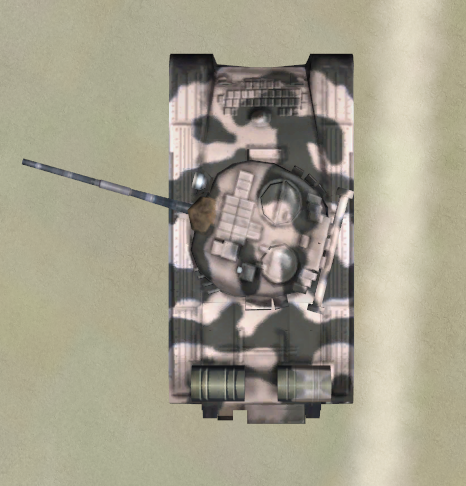
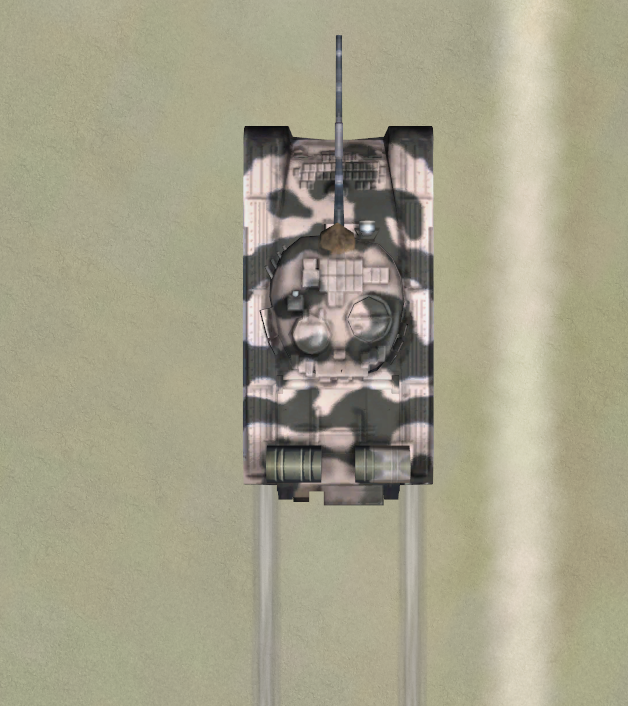
This scenario assumes the user is loading up the T_80_MBT tank model described in the target file snippet above.
If using AeHost:
- Click on the Database section Global, under Region select Saudi Arabia.
- Under positions select the 0412_AUTOGEN_OEJF_KING_FAISAL_NB predefined position.
- On the Ownship section, look right and fly over and down to the runway.
- Lower the ownship altitude to about 30.0
- On the Targets section under Target Creation select Ground Target, then select 1 and click Create.
- Click the Conform checkbox
- This will add a tank model to the scene.
- Go to the camera tab. Click Target Stealth Camera. Under Camera Presets choose Top Near or which ever view you like best. You can mess with the manual Camera Controls as needed to get the view you want.
- Click on the Visual Model and Special Effects tab within the Targets section. Select 1 from the Articulation section.
- Change the value from 0.0 to 25.0, 75.0 etc or just hold down the arrows and watch the turret spin.
- To see tread marks add movt_hv[0].tread_marks to Spy and OVRD it to 4.
- In aeHost go to the Targets tab and click the double arrows to make the tank drive forward. You will see tracks behind the tank.
If using Spy
- Set movt_hv[0].type to 1
- Set movt_hv[0].position[0] to 21.355996
- Set movt_hv[0].position[1] to 39.169318
- Set movt_hv[0].val_artic[1] to 0.0 then 25.0 then 75.0 etc and observe the turret moving.
Ground Feature CIGI Packets
Entity Control Packet for Ground Targets
To place a ground target use the CIGI Entity Control Packet similar to moving models.
| CIGI Packet Parameter | Value and Range | Nova Variable Mapping |
|---|---|---|
Entity ID | Host determined | N/A |
Entity Type | 1001 - 1999 | movt_hv[x].type |
Parent ID | Valid CIGI Entity ID | movt_hv[x].parent.type movt_hv[x].parent.id |
Roll | -180.0 - 180.0 | movt_hv[x].child.zpr[2] |
Pitch | -90.0 - 90.0 | movt_hv[x].child.zpr[1] |
Yaw | 0.0 - 360.0 | movt_hv[x].movt_xyhv.yaw |
Latitude / X Offset | Degrees if absolute Meters if parented | movt_hv[x].movt_xyhv.pos[0] |
Longitude / Y Offset | Degrees if absolute Meters if parented | movt_hv[x].movt_xyhv.pos[1] |
Altitude / Z Offset | Feet if absolute Meters if parented | movt_hv[x].child.zpr[0] |
Component Control Packets for Ground Targets
| Component Class | CigiCompCtrlV3 | ||
|---|---|---|---|
| CompID | Functionality Mapping / SpyClient Value | Description | Control Parameter |
| 0 | Damaged / h2ig.dat.movt_hv[Idx].damaged | Damaged state switch. Damaged state versions of each target must be defined in a damaged targets file. Each entry must correspond to the entries in the regular targets file. The damaged targets file is defined alongside the regular targets file with the token, "ConfigTgtsDestroy_File". | CompState: 0, 2 (Normal, Destroyed, Damaged) |
| 1 | Lights / h2ig.dat.movt_hv[Idx].lights | Turns on lights. | CompState: 0, 1 |
| 2 | Shoot / h2ig.dat.movt_hv[Idx].shoot | Turns on shooting effect. | CompState: 0, 1 |
| 3 | Dust_Trail / h2ig.dat.movt_hv[Idx].dust_trail | Turns on dust / smoke trail type. | |
| 4 | Mslflsh / CompData[0]: h2ig.dat.movt_hv[Idx].mslflsh.missile_flash CompData[1]: h2ig.dat.movt_hv[Idx].mslflsh.missile_flash_t | CompData[0] is the missile trigger (++). CompData[1] is the speed of the effect (0 - 10). | CompData[0]: As char Missile Trigger (++) CompData[1]: As char Missile Type See Missile Types. |
| 5 | Speed / h2ig.dat.movt_hv[Idx].movt_xyhv.speed | CompData[0] is speed in m/s for the computation of the dust trail. | CompData[0] - As a float (Speed) |
| 6 | Conform_Disable / h2ig.dat.movt_hv[Idx].conform_disable | Attach / Detach to the ground with automatic conforming. | CompState: 0, 1 |
| 7 | Tread_Marks / h2ig.dat.movt_hv[Idx].tread_marks | Enable tracks. | CompState: 0 - 4 (0: Off, 1 - 4: Width Selection) |
| 8 | Light_Mask / h2ig.dat.movt_hv[Idx].light_mask | Bit field for switch controls. | CompState: |
| 9 | Auto_Wheels | Enables automatic speed-driven wheel rotation. | CompState: 0, 1 |
| 10 | Update_Mode | Enables host control or hooking up to a scripted sequence. | CompState: 0, 10 (Host Control, Scripted) |
| 11 | Collide_Mode | A bitfield specifying what objects the cable should collide with. | CompData[0]: As unsigned short (GetUShortCompData(0, CigiBaseCompCtrl::LSHW)) 0 = None 1 = Terrain 2 = Cultural 4 = Air Targets 8 = Sea Targets 16 = Ground Targets 32 = Weapon Targets 64 = Sling Load 128 = Ground Actor 256 = Cable |
| 12 | Self_Heating | Enables the host to specify if the model's IR signature should be hot, controlled automatically, or manually specified. | CompState: (Mode) 0 = HOT 1 = Manual 2 = Auto CompData[0]: As a float In MANUAL mode, 0 - 1.0 limits temperature on the range of (ambient, max) |
| 13 | Parent.Attachment_Point | Allows the user to optionally specify an attachment point on the parent model if supported. | Model Specific. |
| 14 | ID | Allows the user to optional set the nova ID for scripted sequences. | CompData[0]: As short (GetShortCompData(0, CigiBaseCompCtrl::LSHW)) |
| 15 | Noise_Control | Allows the user to optionally specify a desired noise value for ground targets. When conforming to the terrain, ground targets "bump" to simulate moving over rough terrain. If the effect is too much, users can reduce it by half or completely turn it off. | CompState: 0 - 2 0 = Full 1 = Half 2 = None |
| 16 | Quality | Provides the capability to specify a preferred level of detail (LOD) for the target. | CompState: 0 = Medium 1 = High 2 = Low |
| 17 | Behavior.GoalBehavior.Push_Count | Sets goal ID and increments push_count. | ushort CompData(0, CigiBaseCompCtrl::LSHW) |
| 18 | Behavior.IDBehavior.Repeat | Sets behavior ID and repeat flag. | GetUShortCompData(0, CigiBaseCompCtrl::LSHW) GetUCharCompData(1, CigiBaseCompCtrl::LSB) |
| 19 | Conform_Roadways | Enables this target to conform to roadways with the CRASH_ROADWAY crash type. | CompState: 0, 1 |
Ground Feature FX Tuning
FX Tuning for Ground Targets
No specific FX Tuning is available for ground targets