
Fog
Fog Overview
The fog feature can be used in Nova to create different visibility scenarios.
| Visual Examples | |
|---|---|
Ground Fog
| Patchy Fog
|
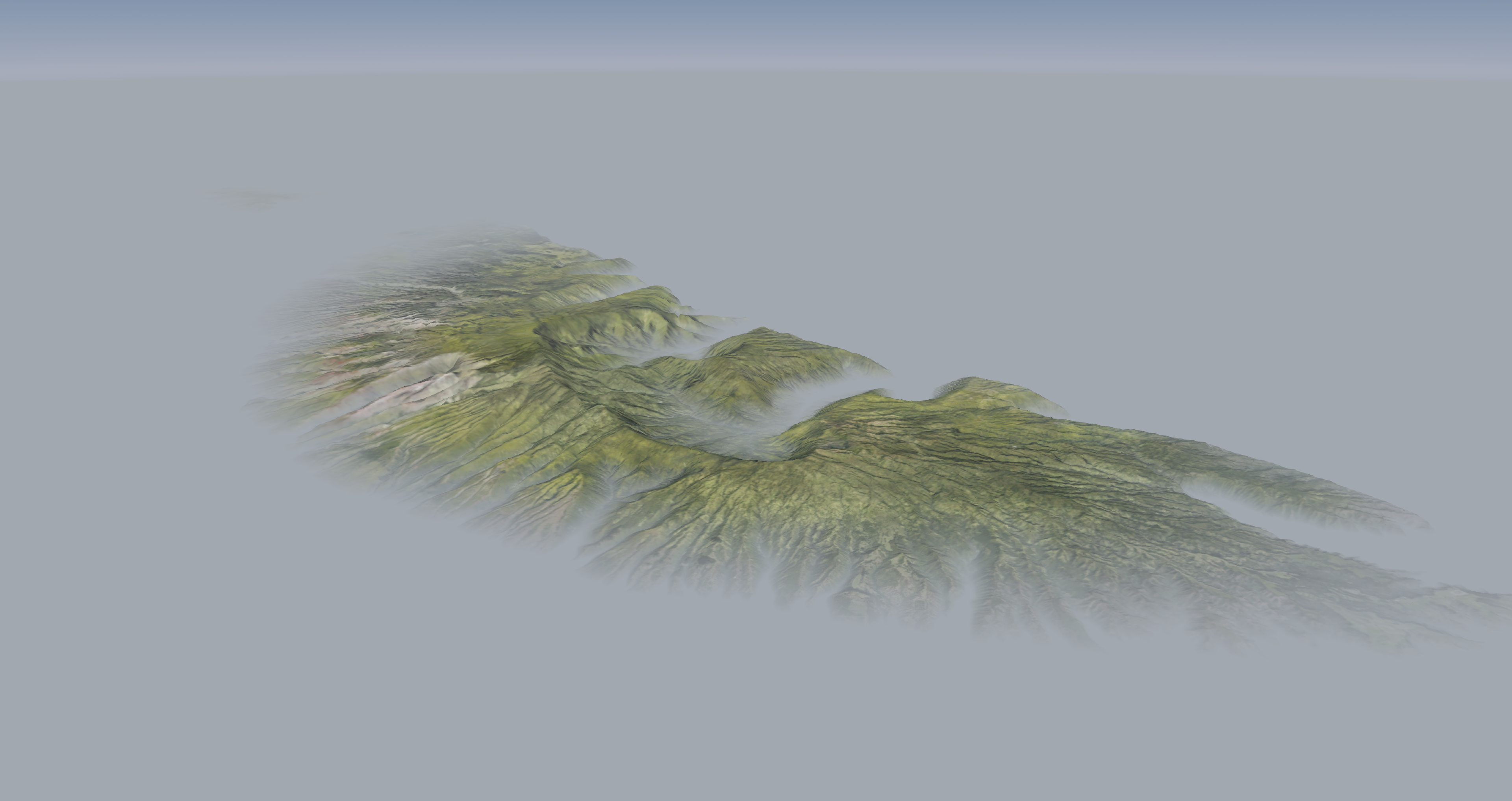
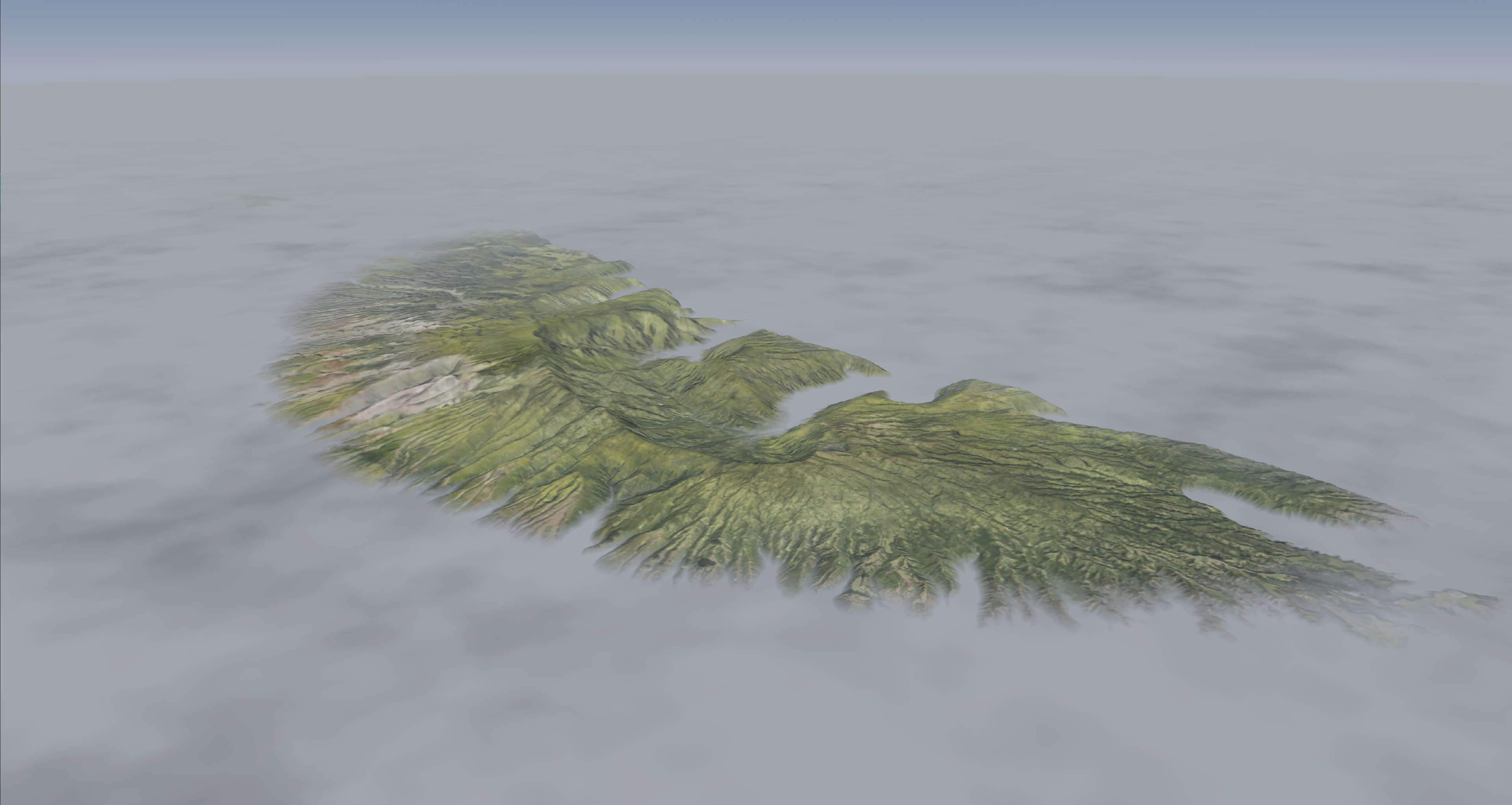
Fog Configuration
Fog Token Configuration
| Token Name | Type | Default Value | Accepted Values | Category | Description |
|---|---|---|---|---|---|
| FogTypeControl | CHAR | 0 | ON, OFF, 1, 0, TRUE, FALSE, AUTO | ICD Modes | |
| HonorExecMode | BOOL | OFF | ON, OFF, 1, 0, TRUE, FALSE | ICD Modes | |
| HostFOV | BOOL | OFF | ON, OFF, 1, 0, TRUE, FALSE | ICD Modes | ON/OFF enables/disables population ubWindowDefNet structs from host-provided ubWindowDefICD structs. |
| IcdArticExtrapolator | ENUM | OFF | ON, OFF, TARGET | ICD Modes | |
| IcdExtrapolator | ENUM | ON | ON, OFF, STANDALONE, SYSTIME, FILTERED_SYSTIME, STANDALONE_SYSTIME, STANDALONE_FILTERED_SYSTIME | ICD Modes | Enables ICD entity extrapolation. OFF: Disabled ON: Enabled on cluster (but not deskside) STANDALONE: Enabled on deskside SYSTIME: Host timestamps in system epoch FILTERED_SYSTIME: Host timestamps are in system epoch; vblank time is filtered STANDALONE_FILTERED_SYSTIME: Deskside with system timestamps and vblank filter |
| IcdExtrapolatorAnalysis | FLOAT | 0.5 | -FLOAT_MAX to FLOAT_MAX, inclusive | ICD Modes | FIXME: Obsolete this. No longer used. |
| IcdExtrapolatorAngleThreshold | FLOAT | 12 | -FLOAT_MAX to FLOAT_MAX, inclusive | ICD Modes | Distance threshold after which we trigger a reset (in degrees). |
| IcdExtrapolatorFactor | FLOAT | 3 | -FLOAT_MAX to FLOAT_MAX, inclusive | ICD Modes | Poorly named. Max history samples for extrapolation (in 1..N_HISTORY_BE_SAMPLES). Note that for air targets on the Frontend, 2 is added to this value internally. |
| IcdExtrapolatorFade | FLOAT | 5 | -FLOAT_MAX to FLOAT_MAX, inclusive | ICD Modes | Fade time (in seconds). |
| IcdExtrapolatorThreshold | FLOAT | 50 | -FLOAT_MAX to FLOAT_MAX, inclusive | ICD Modes | Distance threshold after which we trigger a reset (in meters). |
| IcdExtrapolatorTimeOut | FLOAT | 0.5 | -FLOAT_MAX to FLOAT_MAX, inclusive | ICD Modes | Timeout after which we trigger a reset (in seconds). |
| IcdExtrapolatorTransportDelay | FLOAT | 0 | -FLOAT_MAX to FLOAT_MAX, inclusive | ICD Modes | Transport delay between host timestamp and extrapolator backend, in milliseconds. Used in SYSTIME modes. |
| IcdGunnerTracerExtrapolator | ENUM | ON | ON, OFF, STANDALONE | ICD Modes | |
| IcdLosExtrapolator | ENUM | ON | ON, OFF, STANDALONE | ICD Modes | |
| IcdWeaponExtrapolator | ENUM | ON | ON, OFF, STANDALONE | ICD Modes | |
| IgnoreOwnshipPosOffset | BOOL | OFF | ON, OFF, 1, 0, TRUE, FALSE | ICD Modes | ON forces ubOwnship to ignore the ICD frustum position offset (XYZ) on the render and use the channel CFG-defined position offset instead. Also forces frustum orientation offset (HPR) to (0,0,0), ignoring the ICD and channel CFG-defined orientation offsets. |
| LatencyTestControl | BOOL | OFF | ON, OFF, 1, 0, TRUE, FALSE | ICD Modes | |
| MinimumEntityQuality | ENUM | LOW | LOW, MEDIUM, HIGH | ICD Modes | |
| SensorShadowControl | ENUM | SENSORHOST | ON, OFF, SENSORHOST, ICD, ICD_DBID | ICD Modes | |
| TextLabelChannelID | UNSIGNED INT | 0 | Greater than or equal to 0 less than UINT_MAX (0 <= t < UINT_MAX) | ICD Modes | |
| WeaponHPRClone | BOOL | ON | ON, OFF, 1, 0, TRUE, FALSE | ICD Modes | Forces weapon (sensor camera) orientation to match ownship's orientation (in the ICD phase). This is done on FrontEnd and Standalone nodes. Useful for syncing OTW and sensor frustums. |
| Token Name | Type | Default Value | Accepted Values | Category | Description |
|---|---|---|---|---|---|
| AutoCloudCulturalIllum | BOOL | OFF | ON, OFF, 1, 0, TRUE, FALSE | Rendering Weather | |
| AutoCloudCulturalIllumCount | FLOAT | 25000 | -FLOAT_MAX to FLOAT_MAX, inclusive | Rendering Weather | |
| AutoCloudCulturalIllumFactor | FLOAT | 1 | -FLOAT_MAX to FLOAT_MAX, inclusive | Rendering Weather | |
| AutoCloudCulturalIllumViewCount | FLOAT | 15000 | -FLOAT_MAX to FLOAT_MAX, inclusive | Rendering Weather | |
| BlackSky | BOOL | OFF | ON, OFF, 1, 0, TRUE, FALSE | Rendering Weather | |
| CloudCulturalIllumDefault | FLOAT | 0 | -FLOAT_MAX to FLOAT_MAX, inclusive | Rendering Weather | |
| CloudMoonIlluminationFactor | FLOAT | 1 | 0 to 1, inclusive | Rendering Weather | Factor to control moon cloud/fog illumination in OTW/CCD |
| DisableCloudSort | BOOL | OFF | ON, OFF, 1, 0, TRUE, FALSE | Rendering Weather | |
| InsideCloudVisibilityFactor | FLOAT | 1 | Greater than 0 Less than or equal to FLOAT_MAX ( 0 < x <= FLOAT_MAX ) | Rendering Weather | |
| LayeredHazeColors | BOOL | ON | ON, OFF, 1, 0, TRUE, FALSE | Rendering Weather | Sets whether layered haze colors are used If: 1) OTW or RADAR 2) Not Planter 3) HDRLighting is OFF or ON. Ignored and implicitly forced ON for sensor types where HDRLighting ADVANCED is active. Ignored and implicitly forced OFF if: HDRLighting is OFF or ON, and 1) Sensor type != OTW or RADAR or 2) Is Planter. |
| LayeredHazeDensityInitValue | FLOAT | 0.66 | -FLOAT_MAX to FLOAT_MAX, inclusive | Rendering Weather | |
| LightInsideCloudRange | FLOAT | 100 | Greater than 0 Less than or equal to FLOAT_MAX ( 0 < x <= FLOAT_MAX ) | Rendering Weather | |
| LightningIntensityFactor | FLOAT | 1 | -FLOAT_MAX to FLOAT_MAX, inclusive | Rendering Weather | |
| RainColorFactor | FLOAT | 1 | -FLOAT_MAX to FLOAT_MAX, inclusive | Rendering Weather |
| Token Name | Type | Default Value | Accepted Values | Category | Description |
|---|---|---|---|---|---|
| AirTgtLightControl | ENUM | ADVANCED | OFF, ON, FULL, AFRL, ADVANCED | Rendering Modes | |
| AllowDXT1Promotion | BOOL | OFF | OFF, ON, 1, 0, TRUE, FALSE | Rendering Modes | When FALSE, prevents DXT1 clipmaps from being promoted to DXT3 / DXT5. |
| ArbMakeCurrentRead | BOOL | OFF | OFF, ON, 1, 0, TRUE, FALSE | Rendering Modes | |
| AreaTestCull | BOOL | ON | OFF, ON, 1, 0, TRUE, FALSE | Rendering Modes | If AreaTextQuery ON, setting this to ON enables a CPU-side frustum-cull check on sun / moon boxes. Only if they pass, are occlusion queries actually issues to test visibility. Setting this to OFF, issues occlusion queries regardless. |
| AreaTestQuery | BOOL | OFF | OFF, ON, 1, 0, TRUE, FALSE | Rendering Modes | If ON, quads are used for the sun / moon visibility tests, and SunGlowQuerySize / MoonGlowQuery set the half-width of the quads used (drawn at the far plane; see SkyFarPlane). If OFF, fat POINT features are used for the occlusion test (size = 100 for sun and 12 for moon). |
| AutoMoonIllum | BOOL | ON | OFF, ON, 1, 0, TRUE, FALSE | Rendering Modes | |
| BindlessBuffers | BOOL | OFF | OFF, ON, 1, 0, TRUE, FALSE | Rendering Modes | Whether or not to use the Nvidia bindless buffer object access extensions. (DO NOT OBSOLETE! Useful in combination with Nsight Graphics!) |
| BindlessBuffersForDynamic | ENUM | OFF | OFF, ON, FORCE | Rendering Modes | Whether or not to use Bindless VBOs on dynamic geometry data. NOTE: While buffer objects resident in GPU memory are faster for the GPU-side access, they are slower to update from the CPU. Similarly, buffer objects resident in "CPU pinned" memory are "slower" for the GPU to access but faster for the CPU to update. The former (and previous lack of knowledge of how to achieve the latter) is likely the reason why this CFG token was created. |
| CalcSunPosAsEquatorOnEquinox | BOOL | OFF | OFF, ON, 1, 0, TRUE, FALSE | Rendering Modes | Token that overrides how the sun position is calculated when the ICD is NOT controlling the ephemerides. If ON, then the sun position is calculated as though the ownship is at the celestial equator and the time of year is one of the equinoxes. If OFF, then the sun position will take the ownships true lan, lon, and time of year into account when calculating the sun position. |
| ClearColorPlanes | BOOL | ON | OFF, ON, 1, 0, TRUE, FALSE | Rendering Modes | |
| ClearSky | BOOL | OFF | OFF, ON, 1, 0, TRUE, FALSE | Rendering Modes | Render with a fully transparent sky (i.e. alpha 0.0). |
| CloudShadows | BOOL | OFF | OFF, ON, 1, 0, TRUE, FALSE | Rendering Modes | |
| CulturalLightPspriteDisable | BOOL | OFF | OFF, ON, 1, 0, TRUE, FALSE | Rendering Modes | If FALSE, PspriteDisable = FALSE and FX::LightpointPSprite = TRUE, point sprites are rendered for cultural lights, else quads (tris). |
| DbLightBaseFOV | FLOAT | 30 | 0.05 to 100, inclusive | Rendering Modes | |
| DbPreload | BOOL | ON | OFF, ON, 1, 0, TRUE, FALSE | Rendering Modes | If ON, pre-renders the scene graph (_lscene) on frame 1. This occurs after ShaderPreload and TexturePreload. |
| DimmableCulturalLights | BOOL | OFF | OFF, ON, 1, 0, TRUE, FALSE | Rendering Modes | |
| DisablePrimLengthsCheck | BOOL | OFF | OFF, ON, 1, 0, TRUE, FALSE | Rendering Modes | |
| DynamicBufferUploadMethod | ENUM | SUBLOAD | MAP_DIRECT, SUBLOAD, STREAMING | Rendering Modes | Preferred method for uploading dynamic VBO data from the CPU to the GPU. MAP_DIRECT = Directly map the target VBO. SUBLOAD = Update via buffer SubData. STREAMING = Blit into streaming buffer, and then do a piplined copy to the target buffer object. |
| EctxToCmtxFileTranslatePolicy | ENUM | PREFER_CMTX_CMSX | PREFER_ECTX_ECSX, PREFER_CMTX_CMSX, STRICT_CMTX_CMSX, NONE | Rendering Modes | This value is used to control the policy for the file translator aePreferredExtensionFilePathTranslator. |
| EnvironmentMapSize | INT | 32 | INT_MIN to INT_MAX, inclusive | Rendering Modes | Sky cube environment map face dimensions (in texels). Only 32x32 and 64x64 are supported. |
| ExtendedHorizon | BOOL | OFF | OFF, ON, 1, 0, TRUE, FALSE | Rendering Modes | |
| FeatureShadowAmbientFactor | FLOAT | 0.55 | 0 to 1, inclusive | Rendering Modes | |
| FeatureTerrainShadow | INT | 0 | INT_MIN to INT_MAX, inclusive | Rendering Modes | Finest terrain shadow to prefer for features (0 is finest). |
| ForceBlit | ENUM | OFF | OFF, ON, AUTO | Rendering Modes | |
| ForceMsAlpha | BOOL | OFF | OFF, ON, 1, 0, TRUE, FALSE | Rendering Modes | ON forces use of MSALPHA even when the scene render target is not multisampled (i.e. "CH#_MULTISAMPLE_MODE OFF" specified). NOTE: Support for this token appears to be incomplete. See also MsAlphaDisable. |
| FreeTextureMem | BOOL | ON | OFF, ON, 1, 0, TRUE, FALSE | Rendering Modes | Whether or not to free CPU memory used for "most" textures after GPU upload, and to prerender with textures after startup. In more detail, ON triggers GPU upload and CPU storage deletion for all TEXTURES which do not have FREE_HOST_TEXTURE_MEMORY OFF. It also triggers prerendering with all stateManager-known textures on frame 7. OFF, suppresses this behavior. |
| HaloLux | BOOL | OFF | OFF, ON, 1, 0, TRUE, FALSE | Rendering Modes | Forces HIE *LIGHT/*LUX/*LUZ tokens to be treated as HALO tokens in NVG. NOTE: Does NOT force *STROBE tokens to halo in NVG. Also, HALO tokens always halo. Finally, this have no effect on baked bins light points and strobes. |
| HDRGain | BOOL | OFF | OFF, ON, 1, 0, TRUE, FALSE | Rendering Modes | |
| HDRLighting | BOOL | OFF | OFF, ON, ADVANCED | Rendering Modes | Settings: OFF, ON, ADVANCED. Default: ADVANCED. For OTW, LLTV, or COLOR_LLTV, enables newer scene lighting processing which does not clamp the vertex shader color output to 0.1 (thus "HDR"). Forced OFF internally for other sensor types. In OTW/LLTV/COLOR_LLTV, forced ON when set to OFF if either projected shadows or planar reflections are enabled. NOTE: When OFF (explicitly or implicitly), the vertex shader color output clamping policy is determined by VertexColorClamping. OFF: No clamping ON: Clamping enabled for fixed-point color render targets only. |
| HDRLightingTerrainMultiplier | FLOAT | 1 | 0.5 to 1.5, inclusive | Rendering Modes | |
| HIEVertexBuffers | BOOL | OFF | OFF, ON, 1, 0, TRUE, FALSE | Rendering Modes | Whether or not to use VBOs for .HIE objects. |
| HorizonDepressScale | FLOAT | 1 | -FLOAT_MAX to FLOAT_MAX, inclusive | Rendering Modes | |
| LightAttenFactor | FLOAT | 2.5 | 0.01 to 100, inclusive | Rendering Modes | |
| LightFogRainScaleFactor | FLOAT | 1.5 | 0.05 to 10, inclusive | Rendering Modes | |
| LightMapIntensityScale | FLOAT | 1 | 0.001 to 10, inclusive | Rendering Modes | Scale factor applied to additive textures. |
| LightPointAutoSwitchDawnThreshold | FLOAT | 6.9 | -FLOAT_MAX to FLOAT_MAX, inclusive | Rendering Modes | Autoswitch lux lights only on after LightPointAutoSwitchDuskThreshold or before LightPointAutoSwitchDawnThreshold. Ignored in NVG modes or for non-autoswitch lux lights, which are always on, or in LWIR / MWIR where light points are always off. |
| LightPointAutoSwitchDuskThreshold | FLOAT | 20.5 | -FLOAT_MAX to FLOAT_MAX, inclusive | Rendering Modes | Autoswitch lux lights only on after LightPointAutoSwitchDuskThreshold or before LightPointAutoSwitchDawnThreshold. Ignored in NVG modes or for non-autoswitch lux lights, which are always on, or in LWIR / MWIR where light points are always off. |
| LightPointDigitalSensorGlobalScaleFactor | FLOAT | 2.2 | 0.05 to 10, inclusive | Rendering Modes | Scale factor applied to distance_scaled light point sizes in MWIR / LLTV / CCDNVG / ColorLLTV. In these modes, LightPointGlobalScaleFactor is ignored. NOTE: This scale factor is applied after PointSizeFactor (which maps original point sizes to base point sizes) and PointSizeScaleRangeFactor / PointSizeScaleRange (which map base point sizes to distance-scaled point sizes). |
| LightPointGlobalScaleFactor | FLOAT | 1 | 0.05 to 10, inclusive | Rendering Modes | Scale factor applied to distance_scaled light point sizes in MWIR / LLTV / CCDNVG / ColorLLTV. In these modes, LightPointGlobalScaleFactor is ignored. NOTE: This scale factor is applied after PointSizeFactor (which maps original point sizes to base point sizes) and PointSizeScaleRangeFactor / PointSizeScaleRange (which map base point sizes to distance-scaled point sizes). |
| LightPunchThrough | FLOAT | 0.95 | 0 to 2, inclusive | Rendering Modes | |
| LightScaleClampFactor | FLOAT | 0.3 | 0.01 to 100, inclusive | Rendering Modes | |
| LightScaleFactor | FLOAT | 0.75 | 0.05 to 100, inclusive | Rendering Modes | |
| LuxTraverse | CHAR | 0 | OFF, ON, 1, 0, TRUE, FALSE, AUTO | Rendering Modes | Allows fixed light features (from ConfigDB_File) to be loaded and rendered separately from the geometry (FALSE by default). |
| MaxSelfShadowedAirTargets | UNSIGNED INT | 0 | 0 to 16, inclusive | Rendering Modes | Maximum number of on-screen air targets that will be self shadowed concurrently. |
| MaxSelfShadowedSeaTargets | UNSIGNED INT | 0 | 0 to 16, inclusive | Rendering Modes | Maximum number of on-screen sea targets that will be self shadowed concurrently. |
| MinBindlessTextures | INT | 22000 | INT_MIN to INT_MAX, inclusive | Rendering Modes | Minimum number of bindless textures. |
| MoonGlowCountFactor | FLOAT | 55 | -FLOAT_MAX to FLOAT_MAX, inclusive | Rendering Modes | |
| MoonGlowFilterFactor | FLOAT | 0.6 | -FLOAT_MAX to FLOAT_MAX, inclusive | Rendering Modes | |
| MoonGlowQuerySize | FLOAT | 0.014 | -FLOAT_MAX to FLOAT_MAX, inclusive | Rendering Modes | If AreaTestQuery ON, specifies the half-width of the quad used for the moon's occlusion test (drawn at the far plane; see SkyFarPlane). |
| MoonIllum | FLOAT | 0.1 | 0 to 1, inclusive | Rendering Modes | |
| MoonPhaseCycle | CHAR | 0 | OFF, ON, 1, 0, TRUE, FALSE | Rendering Modes | Cycle moon phase for sensorhost capture / testing. |
| MoonPhaseHorizon | FLOAT | 0.05 | -FLOAT_MAX to FLOAT_MAX, inclusive | Rendering Modes | |
| MsAlphaDisable | BOOL | OFF | OFF, ON, 1, 0, TRUE, FALSE | Rendering Modes | Forces all uses of MSAPLHA transparency to use HIGH_QUALITY transparency instead. This also occurs if "CH#_MULTISAMPLE_MODE OFF" and "ForceMsAlpha OFF". See also ForceMsAlpha. |
| NightDarkLevel | FLOAT | 0.03 | 0 to 1, inclusive | Rendering Modes | |
| NVGDayNightScale | FLOAT | 1 | 0.001 to 10, inclusive | Rendering Modes | Scale factor applied to day / night textures when in NVG mode. |
| OTWCityGlow | BOOL | OFF | OFF, ON, 1, 0, TRUE, FALSE | Rendering Modes | |
| OTWMoonIntensityRGB | VECTOR OF 3 FLOATS | 0.150000 0.200000 0.250000 | N/A | Rendering Modes | |
| PgdFeatFilePreload | BOOL | ON | OFF, ON, 1, 0, TRUE, FALSE | Rendering Modes | |
| PlanarReflections | ENUM | OFF | OFF, VERY_LOW, LOW, MID, HIGH, MAX | Rendering Modes | Controls which objects are cast into planar reflections, as well as the LOD scale with which they are cast. Settings: OFF, VERY_LOW, LOW, MID, HIGH, MAX. Ownship: MAX+ + target shadows. Terrain Decorations: MAX+. Terrain, Features: HIGH+ Clouds, SFX, DB Lights, Air Targets, Ground Targets, Sling Loads: VERY_LOW+ See also: REFLECTION_*_LOD_SCALE in ReflectionMaps.fx for the per-mode LOD scale tuning factors. |
| PlanarReflectionsClip | BOOL | ON | OFF, ON, 1, 0, TRUE, FALSE | Rendering Modes | If T, enables clipping away of non-sensical reflections of geometry "below" the reflection plane up "above" it into the scene when casting reflections of features, ownship, terrain decorations, DB lights, SFX, and clouds. NOTE: Casting of reflections for the following objects types ignore PlanarReflectionsClip and always clip away nonsensical reflection: terrain, sea targets, air targets, sling loads, and ground targets. |
| PlanarReflectionsOnSea | BOOL | ON | OFF, ON, 1, 0, TRUE, FALSE | Rendering Modes | Enables sea (terrain) to receive planar reflections. NOTE: Requires PlanarReflections != OFF and WaterPerPixelFresnel ON. |
| PointSizeFactor | FLOAT | 1 | -FLOAT_MAX to FLOAT_MAX, inclusive | Rendering Modes | For HIE-loaded light points (but NOT those from the light point clipmap), the base light point size is computed as the point size specified in the LUX file (SIZ%f) scaled by this factor (PointSizeFactor). In NVG with SensorHost ON, an addition, 0.5 factor is applied for halos. |
| PointSizeScaleRange | FLOAT | 2500 | -FLOAT_MAX to FLOAT_MAX, inclusive | Rendering Modes | HIE-loaded light points (but NOT those from the light point clipmap) increase base point sizes based on the distance from the eyepoint using this factor: (1.0f + f * (1 - (igMin(distanceFromEye, r) / r))), where f=PointSizeScaleRangeFactor and r = PointSizeScaleRange. This scaled base point size is then clamped to [0.1, 12.0]. See also PointSizeFactor. |
| PointSizeScaleRangeFactor | FLOAT | 2 | -FLOAT_MAX to FLOAT_MAX, inclusive | Rendering Modes | HIE-loaded light points (but NOT those from the light point clipmap) increase base point sizes based on the distance from the eyepoint using this factor: (1.0f + f * (1 - (igMin (distanceFromEye, r) / r))), where f = PointSizeScaleRangeFactor and r = PointSizeScaleRange. Effectively this means that at distance >= PointSizeScaleRange, PointSizeScaleRangeFactor has NO effect (leaving the base light point size unmodified, whereas at distance 0, PointSizeScaleRangeFactor has "maximum effect, increasing the base size of the light point by a factor of (1 + PointSizeScaleRangerFactor). This scaled base point size is then clamped to [0.1, 12.0]. See also PointSizeFactor. |
| PrimitiveRestart | BOOL | OFF | OFF, ON, 1, 0, TRUE, FALSE | Rendering Modes | Whether or not to use PrimitiveRestart. |
| ProjShadow | BOOL | OFF | OFF, ON, 1, 0, TRUE, FALSE | Rendering Modes | Enables projected shadows for ?. See also: ProjShadow{Range, LODScaleFactor, CullClamp, CullFactor}. NOTE: Contrary to the name, this does NOT enable projected shadows onto the terrain, fixed features, the sea, or other targets via aeProjShadowManager and aeTargetShadowManager. See ProjTargetShadows instead. |
| ProjShadowCullClamp | FLOAT | -1 | -FLOAT_MAX to FLOAT_MAX, inclusive | Rendering Modes | |
| ProjShadowCullFactor | FLOAT | 0.62 | -FLOAT_MAX to FLOAT_MAX, inclusive | Rendering Modes | |
| ProjShadowLODScaleFactor | FLOAT | 9 | -FLOAT_MAX to FLOAT_MAX, inclusive | Rendering Modes | |
| ProjShadowRange | FLOAT | 640000 | -FLOAT_MAX to FLOAT_MAX, inclusive | Rendering Modes | |
| ProjTargetShadows | BOOL | OFF | OFF, ON, 1, 0, TRUE, FALSE | Rendering Modes | If terrain shadows are also enabled, enables projecting shadows from selected moving models (targets) onto the terrain, terrain features, the sea, and sea targets. If enabled with ProjTargetShadowsForShips, then selected moving model shadows (e.g. sea targets) are also cast onto the terrain and the sea. MaxSelfShadowedAirTargets and/or MaxSelfShadowedSeaTargets may also be set to cause air and/or sea targets, respectively, to self-shadow. |
| ProjTargetShadowsForShips | BOOL | OFF | OFF, ON, 1, 0, TRUE, FALSE | Rendering Modes | If enabled with terrain shadows and ProjTargetShadows, then selected moving model shadows (usually just sea targets) are cast onto the ground and the sea. MaxSelfShadowedAirTargets and/or MaxSelfShadowedSeaTargets may also be set to cause air and/or sea targets, respectively, to self-shadow. |
| PSpriteDisable | BOOL | OFF | OFF, ON, 1, 0, TRUE, FALSE | Rendering Modes | If FALSE, point sprites are rendered, else quads (tris). |
| QueryCompletionSkipStep | ENUM | TRIPLE | OFF, ON, DISABLE, SINGLE, DOUBLE, TRIPLE, QUADRUPLE | Rendering Modes | If TestQueryCompletion is ON, allows for not testing occlusion completion every frame (every 2 * Nth frame instead). If TestQueryCompletion is OFF, assumes completion every 2 * Nth frame). |
ReflectSunMoon | BOOL | OFF | OFF, ON, 1, 0, TRUE, FALSE | Rendering Modes | |
| ReflectionRegions_File | STRING | NULL | N/A | Rendering Modes | |
SeasonalTextureControl | ENUM | 0 | OFF, ON, 1, 0, TRUE, FALSE, AUTO | Rendering Modes | Enables seasonal texture use. Modes: 1) Legacy Seasonal Textures: Requires WorldWideFeatures != BINDLESS. SeasonalControlFXFile provides for modifying the TEX0 bindings on selected GEOSTATEs for each season. 2) Bindless Seasonal Textures: Requires WorldWideFeatures = BINDLESS (i.e. bindless features) and interally forces SeasonalTextureControl AUTO. |
| SensorBlendMode | BOOL | OFF | OFF, ON, 1, 0, TRUE, FALSE | Rendering Modes | Originally, ON activated the old, obsolete intra-channel sensor fusion. This caused the channel to automatically alternate the selected sensors and blend them according aeWeapon2IG's blendedWeaponID, blendFactor parameters. There should be no current reason to enable this. However, for legacy reasons, some Nova code and configs (include default configs) still set or expect this to be ON for some multi-sensor switching and sensor fusion setups. |
| ShaderPreload | BOOL | ON | OFF, ON, 1, 0, TRUE, FALSE | Rendering Modes | If ON, on startup, pre-generates and pre-compiles shader permutations listed in vectors.cfg. Also triggers some ownship and FX ICD overrides over the first 30 frames. |
| ShadowAlpha | BOOL | ON | OFF, ON, 1, 0, TRUE, FALSE | Rendering Modes | |
| ShadowProcessingInterval | INT | 1 | 1 to 2, inclusive | Rendering Modes | Number of frames over which project / target shadows and terrain shadows are interleaved. Allow values are 1 and 2. |
| SkipRepeatedTex | BOOL | ON | OFF, ON, 1, 0, TRUE, FALSE | Rendering Modes | |
| SkyFullDome | BOOL | ON | OFF, ON, 1, 0, TRUE, FALSE | Rendering Modes | |
| SkyPreload | CHAR | 0 | OFF, ON, 1, 0, TRUE, FALSE | Rendering Modes | |
| SnowPSpriteDisable | BOOL | OFF | OFF, ON, 1, 0, TRUE, FALSE | Rendering Modes | If FALSE, point sprites are rendered for snow, else quads (tris). |
| StandaloneFullCubeMap | BOOL | OFF | OFF, ON, 1, 0, TRUE, FALSE | Rendering Modes | |
| StarInt | FLOAT | 1 | 0 to 1, inclusive | Rendering Modes | |
| StarReflectControl | BOOL | OFF | OFF, ON, 1, 0, TRUE, FALSE | Rendering Modes | |
StarSize | FLOAT | 0.65 | 0 to 5, inclusive | Rendering Modes | |
SunAmbientFactor | FLOAT | 1 | 0 to 1, inclusive | Rendering Modes | |
SunGlowCountFactor | FLOAT | 350 | -FLOAT_MAX to FLOAT_MAX, inclusive | Rendering Modes | |
SunGlowFilterFactor | FLOAT | 0.6 | -FLOAT_MAX to FLOAT_MAX, inclusive | Rendering Modes | |
| SunGlowQuerySize | FLOAT | 0.07 | -FLOAT_MAX to FLOAT_MAX, inclusive | Rendering Modes | If AreaTestQuery ON, specifies the half-width of the quad used for the sun's occulusion test (drawn at the far plane; see SkyFarPlane). |
| SunMoonGlow | BOOL | ON | OFF, ON, 1, 0, TRUE, FALSE | Rendering Modes | |
TerrainShadowClipSize | INT | 1024 | INT_MIN to INT_MAX, inclusive | Rendering Modes | The size of the shadowmap for all shadow levels. |
TerrainShadowLazyDeltaT | FLOAT | 0 | -FLOAT_MAX to FLOAT_MAX, inclusive | Rendering Modes | Enables lazy evaluation if nonzero. |
TerrainShadowMaxLevel | INT | 0 | INT_MIN to INT_MAX, inclusive | Rendering Modes | Finest elevation clipmap level to render shadows from. |
TerrainShadowMinLevel | INT | 0 | INT_MIN to INT_MAX, inclusive | Rendering Modes | Coarsest elevation clipmap level to render shadows from. |
TerrainShadowPager | BOOL | OFF | OFF, ON, 1, 0, TRUE, FALSE | Rendering Modes | |
TerrainShadowSunDirBias | FLOAT | 0 | 0 to FLOAT_MAX, inclusive | Rendering Modes | Token to control by how much we shift the shadow away from the light source during convolution. This partly accounts for the convolution spreading the shadow edge into unshadowed areas. |
| TerrainShadowsRequestBudget | INT | -1 | INT_MIN to INT_MAX, inclusive | Rendering Modes | Max number of TF Shadow generation requests to queue per frame. If less than or equal to 0, no request limit is imposed. Note that this budget only applies to TF shadow generation requests, not cloud shadow generation requests. See also TerrainShadowsTimeBudget. |
| TerrainShadowsTimeBudget | FLOAT | 0.005 | -FLOAT_MAX to FLOAT_MAX, inclusive | Rendering Modes | Max amount of CPU frame time to spend queueing TF Shadow generation requests. If less than or equal to 0, no time limit is imposed. Note that this budget only applies to TF Shadow generation requests, not cloud shadow generation requests. See also TerrainShadowsRequestBudget. |
| TerrainTessellation | ENUM | LINEAR | OFF, LINEAR, CATMULL_ROM | Rendering Modes | Type of interpolation for tessellated terrain. |
| TestQueryCompletion | BOOL | ON | OFF, ON, 1, 0, TRUE, FALSE | Rendering Modes | If ON, sun / moon occulusion tests (used to check visibility for sun / moon glows) wait for the GL driver to signal their completion. See also QueryCompletionSkipStep. |
TexturePreload | BOOL | OFF | OFF, ON, 1, 0, TRUE, FALSE | Rendering Modes | If ON, on startup, pre-renders with all textures registered with the default state manager "except" those with the "PRELOAD OFF" attribute set. NOTE: While the default is FALSE, TexturePreload ON is set in the default configs for all RENDER node configs. |
UseARBOcculusionQuery | BOOL | ON | OFF, ON, 1, 0, TRUE, FALSE | Rendering Modes | |
VIndexConversionBufferSize | UNSIGNED INT | 65536 | 0 to UINT_MAX, inclusive | Rendering Modes | Size of the buffer used to convert 32bit indices to 16bit for paged features. |
ValidateIndexBuffers | BOOL | OFF | OFF, ON, 1, 0, TRUE, FALSE | Rendering Modes | |
Version30SeaShading | ENUM | AUTO | OFF, ON, AUTO | Rendering Modes | OFF / ON / AUTO forces v3.0 sea shading. |
VertexBuffers | BOOL | ON | OFF, ON, 1, 0, TRUE, FALSE | Rendering Modes | Whether or not to use GPU VBOs. Set to OFF on nodes which don't need GPU VBOs (e.g. ISECT, Blender). |
| VertexColorClamping | BOOL | ON | OFF, ON, 1, 0, TRUE, FALSE | Rendering Modes | When HDRLighting is OFF (explicitly or implicity; see HDRLighting), this token determines whether vertex shader color output(s) are clamped. OFF = No clamping. ON = Clamping enabled for fixed-point color render targets only. NOTE: This token has no effect when HDRLighting is enabled (which can only be in OTW, LLTV, or COLOR_LLTV). |
| Token Name | Type | Default Value | Accepted Values | Category | Description |
|---|---|---|---|---|---|
| BrownoutSystemSensitivity | FLOAT | 1 | 0.1 to 10, inclusive | Rendering FX | Scalar to affect CDI particle contribution into our brownout effect. |
| FXMaxRange | FLOAT | 60000 | 0 to 300000, inclusive | Rendering FX | |
| ImageTrack | BOOL | OFF | OFF, ON, 1, 0, TRUE, FALSE | Rendering FX | Enable / Disable software-based image tracking on any sensor node. (Image tracking is controlled via the weaponICD's imageTrack input/output). |
| LaserScaleFactor | FLOAT | 1 | -FLOAT_MAX to FLOAT_MAX, inclusive | Rendering FX | |
| LobesOnOwnshipModel | CHAR | 0 | OFF, ON, 1, 0, TRUE, FALSE, AUTO | Rendering FX | True if we want lobes to affect the ownship model. |
| OccludeOwnshipInsideClouds | BOOL | OFF | OFF, ON, 1, 0, TRUE, FALSE, AUTO | Rendering FX | Controls whether the cloud cage will occlude the ownship model or not. |
| RotorWash3D | BOOL | OFF | OFF, ON, 1, 0, TRUE, FALSE, AUTO | Rendering FX | True if we draw the rotorwash using 3D noise and controlling the direction of the noise with a vector. |
| RotorWashCurtainPreBrownout | BOOL | OFF | OFF, ON, 1, 0, TRUE, FALSE, AUTO | Rendering FX | True if we want to draw the rotorwash curtain before the brownout puffs. |
| SoftSpriteRefDepth | FLOAT | 0 | -FLOAT_MAX to FLOAT_MAX, inclusive | Rendering FX | When SoftSprites are enabled, this sets the reference depth from the eye at which the fade-in distance (i.e. (f-n)/SoftSpritesScale) is calibrated to look good. The fade-in distance is scaled up based on (fragment depth / ref depth) to help account for perspective foreshortening. A ref depth of 0.0 (the default for backward-compatibility) applies that same fade-in distance as a constant across all scene depths. See also: SoftSpriteScale, CloudSoftSpriteScale. |
| SoftSpriteScale | FLOAT | 10000 | -FLOAT_MAX to FLOAT_MAX, inclusive | Rendering FX | When SoftSprites are enabled, this sets the fragment alpha scaling factor for "some" soft sprites. The fade-in distance for SoftSprites is given by (far-near)/SoftSpriteScale. This is the distance over which the particle alpha is faded in from 0.0 to full input intensity (which may be less than 1.0). The distance used for testing is the screen-space depth difference (in meters) from sprite effect fragments to the nearest occluder directly behind them in screen-space. See also: SoftSpriteRefDepth, CloudSoftSpriteScale. |
| SoftSprites | BOOL | OFF | OFF, ON, 1, 0, TRUE, FALSE | Rendering FX | When true rendering soft sprite and the underlying off screen rendering will be enabled. |
| UseInsideCloudFog | BOOL | OFF | OFF, ON, 1, 0, TRUE, FALSE | Rendering FX | Controls whether the cloud cage is replaced by a fog effect or not. |
| WindDirACSOffset | FLOAT | 0 | -FLOAT_MAX to FLOAT_MAX, inclusive | Rendering FX |
Fog Data Configuration
None.
Fog Usage
Fog ICD Interface
| Variable | Description |
|---|---|
| ios2ig.dat.fog | Enables / Disables and sets fog type |
| ios2ig.dat.fog_range | Range of the fog in meters |
| ios2ig.dat.fog_layer_range | Range of the layered fog |
| ios2ig.dat.fog_layer_ceiling | The altitude of the top of the fog layer (fog begins to appear here) |
| ios2ig.dat.fog_layer_floor | The altitude of the bottom of the fog layer (fog is the thickest here) |
| ios2ig.dat.visib_fog | Fog visibility in meters |
| ios2ig.dat.varying_fog | Variance in fog |
Fog Runtime Operation
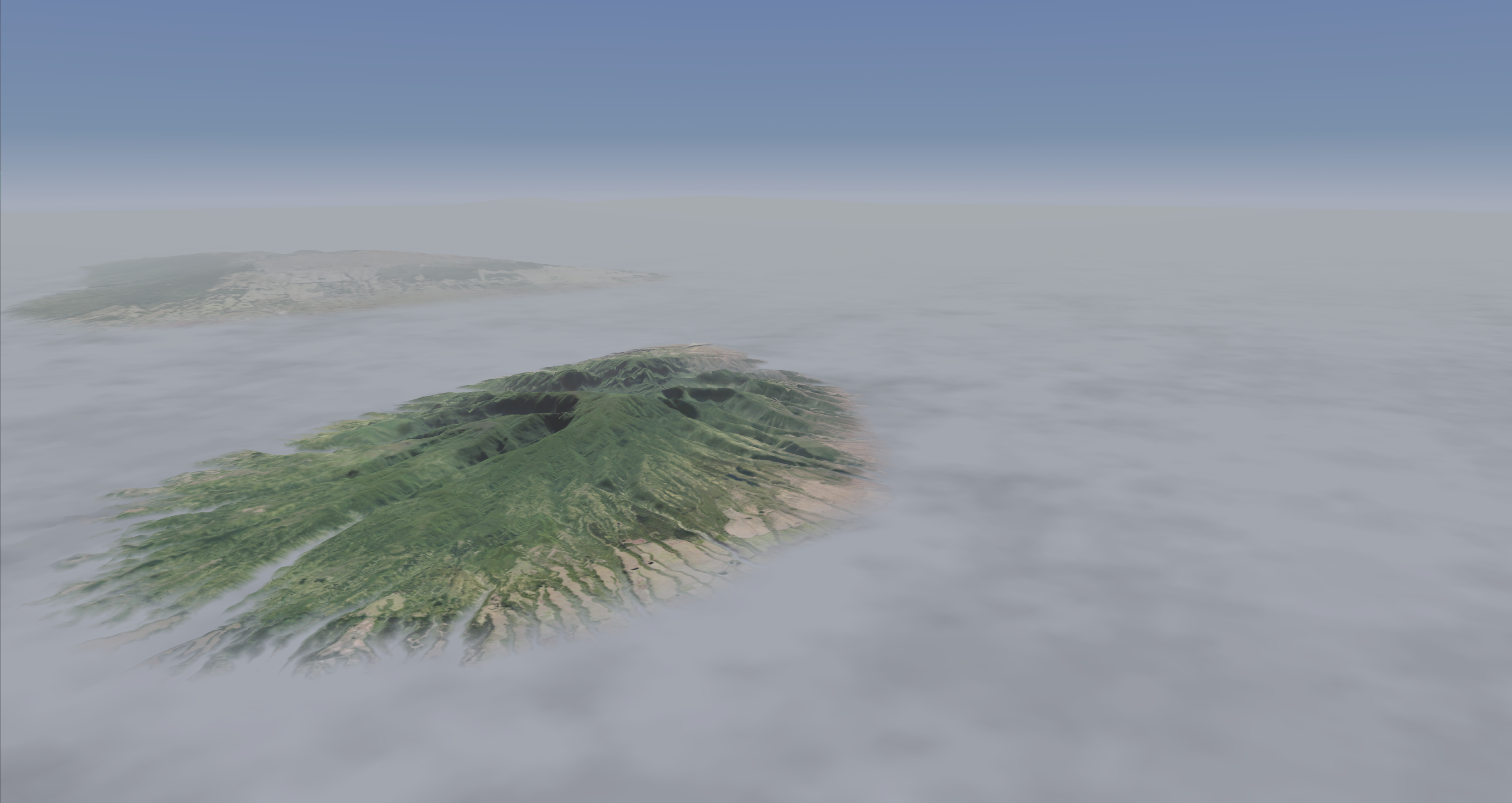
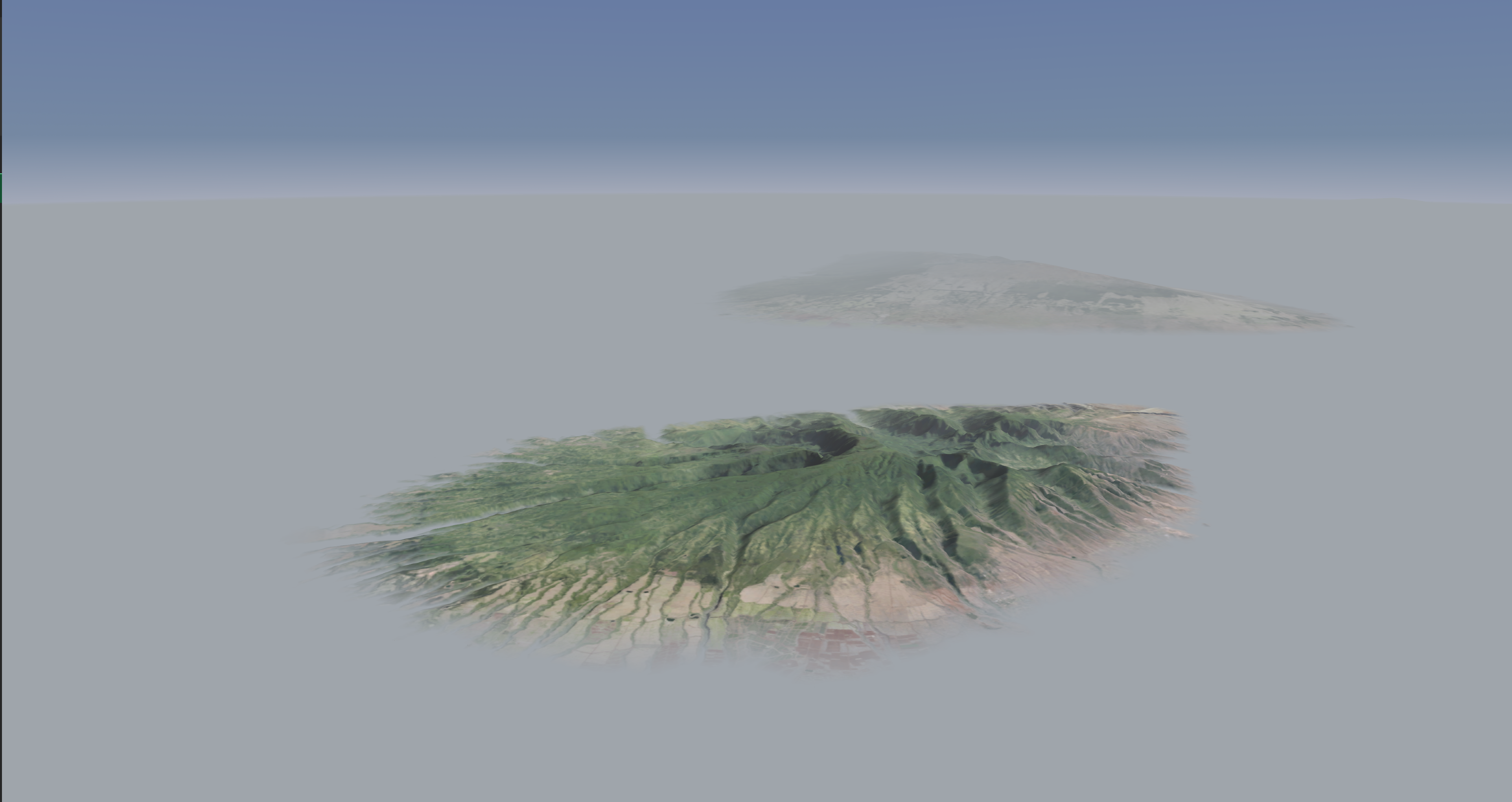
Setting up a fog scene.
This scenario demonstrates a foggy environment scene in Nova.
If using AeHost:
- Locate the Fog Controls section in the Fog panel.
- Select the Patchy Fog button; click the layer drop down next to the Patchy Fog button and select the label titled "5 Patchy Thickest".
- Locate the Range value and change its value to 100.
- Locate the Base, Top (MSL) line; change its Base value to 500 and its Top value to 1000.
If setting values directly in Spy:
- Set fog_range to 100000.
- Set fog_layer_range to 1000.
- Set fog_layer_ceiling to 750.
- Set fog_layer_floor to 250.
- Set visib_fog to 20000.
- Set fog to 5 to enable the fog effect.
Fog CIGI Packets
Component Control Packet for Weather Control (Packet Support)
| CIGI Packet Parameter | Value and Range | Nova Variable Mapping |
|---|---|---|
| Layer ID | 0: Ground Fog 15: Patchy Fog | N/A |
| Weather Enable | Off/On (0, 1) | ios2ig.dat.fog |
| Visibility Range | Meters | ios2ig.dat.fog_layer_range |
| Base Elevation | Meters | ios2ig.dat.fog_layer_floor |
| Thickness | Meters | ios2ig.dat.fog_layer_ceiling |
| Coverage | 0 - 5 | ios2ig.dat.fog + 5 |
| Transition | 0.0 - 1.0 | ios2ig.dat.varying_fog |
Component Control Packet for Atmosphere Control
| Parameter | Support | Description | Nova Variable Mapping |
|---|---|---|---|
| Atmosphere Model Enable |
| This parameter specifies whether the IG should use an atmospheric model to determine spectral radiances for sensor applications. If this parameter is set to Disable (0), source radiances will be calculated. If this parameter is set to Enable (1), apparent radiances will be calculated using the appropriate models. 0 = Disable 1 = Enable | enableAtmos |
| Global Humidity |
| Specifies global humidity in percentage from 0.0 to 100.0 | dat.humidity |
| Global Air Temp |
| Global air temperature in degrees Celsius 0.0 to MAXFLOAT | dat.gnd_temp |
| Global Visibility Range |
| Global visibility range in meters. 0.0 to MAXFLOAT | dat.global_visibility_range |
| Global Horizontal Wind Speed |
| Global wind speed in meters. Setting a value here will set the same value for all wind layers. meters per second 0.0 to MAXFLOAT | dat.wind_veloc[i] |
| Global Vertical Wind Speed |
| Nova does not have a compatible feature for vertical wind speed | N/A |
| Global Wind Direction |
| Global wind direction in meters. Setting a value here will set the same value for all wind layers. 0.0 to 360.0 Note: This is the direction from which the wind is blowing. | dat.wind_dir[i] |
| Global Barometric Pressure |
| dat.baro_pressure |

Fog FX Tuning
FX Tuning for Weather
| Token Name | Default Value | Accepted Values | Description | Token Source File |
|---|---|---|---|---|
| FOG_CONTRAST_THRESHOLD | 0.02 | Fog range / contrast calibration. | Weather.fx | |
| DUST_CLOUD_SCALE | 0.0055 | Dust cloud scale. | ||
| DUST_CLOUD_INTENSITY | 1.0 | Dust cloud intensity. | ||
| DUST_STORM_RADIUS_FACTOR | 2.0 | Dust storm radius scalar. | ||
| DUST_STORM_CEILING_SCALE | 2.0 | Dust storm ceiling scalar. | ||
| DUST_STORM_INTENSITY_SCALE | 1000.0 | Dust storm intensity scalar. | ||
| DUST_STORM_RANGE_SCALE | 30.0 | Dust storm range scalar. | ||
| DUST_STORM_FLOOR_SCALE | -10.0 | Dust storm floor scalar. | ||
| DUST_STORM_VECTOR_SCALE | 8.0 | Dust storm direction scalar. | ||
| DUST_STORM_COLOR | 0.659, 0.6, 0.5 | Dust storm color (RGB). | ||
| WATER_STORM_COLOR | 0.78, 0.83, 0.86 | Water storm color (RGB). | ||
| FIRE_HAZE_COLOR_FACTOR | 0.9, 0.85, 0.8 | Fire haze color factor for fog (RGB). | ||
| WASH_TRANSITION_FRAMES | 60 | Rotor wash frames parameter. | ||
| BLOWING_SNOW_SCALE | 0.001, 0.001 | Blowing snow scalar. | ||
| SNOW_ACCUMULATION_MAT_THRESHOLD | 0.7 | 0.1 to 1.0 | Determines the value of snow accumulation after which the material returns become snow. Any value of snow accumulation less than this value will return the normal materials. | |
| ANTICOL_GAIN_DELAY | 0.05 | Anti-collision lights delay amount. | ||
| ANTICOL_GAIN_DECAY | 0.4 | Anti-collision lights decay scalar. | ||
| ANTICOL_COLOR_CONTROL | FALSE | Anti-collision lights color flag. | ||
| LIGHTNING_WITHOUT_RAIN | TRUE | Lightning without rain flag. | ||
| VARYING_FOG_SPATIAL_SCALE | 350.0 | Varying fog spatial extent. | ||
| VARYING_FOG_INTENSITY | 0.6 | Varying fog intensity scalar. | ||
| LOBE_FOG_INTENSITY | 0.7 | Fog intensity scalar for lobe lighting. | ||
| LOBE_FOG_RANGE | 3000.0 | Fog distance for lobe lighting. | ||
| LOBE_FOB_ATTEN | 0.95 | Fog Time-of-Day attenuation for lobe lighting. | ||
| INSIDE_CLOUD_RANGE | 25.0 | Dust cloud parameter. | ||
| INSIDE_CLOUD_FACTOR | 0.6 | Percent inside a cloud where we begin fogging ownship geometry. | ||
| INSIDE_WASH_RANGE | 100.0 | Rotor wash inside distance. | ||
| PATCHY_CLOUD_FOG_MIN_RANGE | 7500.0 | Fog minimum distance for patchy-clouds. | ||
| LAYERED_HAZE_FLOOR_BASE | -400.0 | Layered haze floor. | ||
| LAYERED_HAZE_FLOOR_SCALE | -600.0 | Layered haze floor scalar. | ||
| LAYERED_HAZE_CEILING_BASE | 400.0 | Layered haze ceiling. | ||
| LAYERED_HAZE_CEILING_SCALE | 600.0 | Layered haze ceiling scalar. | ||
| LAYERED_HAZE_RANGE_BASE | 4000.0 | Layered haze base distance. | ||
| GLOW_FOG_PUNCHTHROUGH_FACTOR | 0.5 | Scalar of fog ranges to cause lights to punch through fog; lower values increase light visibility. | ||
| OWNSHIP_LIGHTS_MUTE_FLARES | TRUE | Controls priority of ownship lights over flares. True: Ownship False: Flares | ||
| ANTICOL_AMBIENT_FACTOR | 0.1 | Anti-collision lights ambient scalar. | ||
| ANTICOL_DIFFUSE_FACTOR | 0.9 | Anti-collision diffuse scalar. | ||
| ANTICOL_ATTENUATION | 1.0, 0.0, 0.005 | Anti-collision lights attenuation. | ||
| ANTICOL_FOG_RANGE | 5000.0 | Anti-collision lights fog distance. | ||
| ANTICOL_TOD_ATTEN | 0.95 | Anti-collision lights time-of-day attenuation. | ||
| ANTICOL_TOD_ATTEN_BIAS | 0.20 | Anti-collision lights time-of-day attenuation bias. | ||
| ANTICOL_CONE_ANGLE | 180.0 | Anti-collision lights cone angle (degrees). | ||
| ANTICOL_FALLOFF | 0.0 | Anti-collision lights falloff scalar. | ||
| SEARCH_LIGHT_TOD_ATTEN | 0.95 | Search lights time-of-day attenuation. | ||
| SEARCH_LIGHT_TOD_ATTEN_BIAS | 0.20 | Search lights time-of-day attenuation bias. | ||
| NAV_AMBIENT_FACTOR | 0.1 | Navigation lights ambient factor. | ||
| NAV_DIFFUSE_FACTOR | 0.6 | Navigation lights diffuse factor. | ||
| NAV_CONE_ANGLE | 89.9 | Navigation lights cone angle (degrees). | ||
| NAV_FALLOFF | 0.005 | Navigation lights falloff scalar. | ||
| SUNRISE_CLOUD_POWER | 1.45 | Sunrise cloud parameter. | ||
| SUNRISE_CLOUD_COLOR | 0.44, 0.27, 0.17 | Sunrise cloud color (RGB). | ||
| HDR_HAZE_CLOUD_LIMIT_COLOR | 0.69, 0.71, 0.74 | HDR Haze cloud limit color (RGB). | ||
| INSIDE_ROTORWASH_OWNREL_DISTANCE | 10.0 | Ownship distance to begin ramping inside rotor wash. | ||
| INSIDE_ROTORWASH_OWNREL_THRESHOLD | 5.0 | Ownship distance where inside rotor wash is 1.0. | ||
| PATCHY_FOG_FULL_DEPTH_THRESHOLD | 1.0 | Depth fraction into patchy fog needed to be consider3ed full depth for visualization. Should be greater than 0.0 and less than or equal to 1.0 |