
Air Targets
Air Targets Overview
Nova supports rendering air targets with various supporting features including lighting, wakes, and articulations.
Air Targets Configuration
Air Targets Data Configuration
air targets are enabled by default in Nova. Any air moving models that are desired need to be defined in the config targets file, This is usually located on the system under E:\CM\data\custom\config_tgts.cfg. air targets have their own category within the targets file called ASIGN_AER.
| Targets File Example - Air Targets | |
|---|---|
list_type ASIGN_AER |
Air Targets Usage
air Targets ICD Interface
| Nova Variable | Description |
|---|---|
mova_hv[i].index | |
mova_hv[i].type | The type of fixed feature corresponding to the targets list |
mova_hv[i].damaged | 0: Not Damaged 1: Destroyed 2: Damaged |
mova_hv[i].update_mode | Conformance of the air target 0: Host Controlled, no air conformance 99: Heavy Vessel Motion 98: Medium Vessel Motion 97: Small Vessel Motion |
mova_hv[i].anticol_lts | |
mova_hv[i].anticol_bottom_lts | |
mova_hv[i].strobe_lts | |
mova_hv[i].position_tail_lts | |
mova_hv[i].position_wing_lts | |
mova_hv[i].formation_lts | |
mova_hv[i].covert_lts | |
mova_hv[i].generic1_lts | |
mova_hv[i].generic2_lts | |
mova_hv[i].landing_lobe | |
mova_hv[i].landing_gear | |
mova_hv[i].trail_type | |
mova_hv[i].muzzle_flash | |
mova_hv[i].quality | Provides the capability to specify a preferred level of detail (LOD) for the target. |
mova_hv[i].self_heating.mode | Enables the host to specify if the model's IR signature should be hot, controlled automatically, or manually specified. In MANUAL mode, 0 - 1.0 limits temperature on the range of (ambient, max) 0: HOT 1: Manual 2: Auto |
mova_hv[i].self_heating.max | |
movs_hv[i].behavior.id | |
movs_hv[i].behavior.goal | |
movs_hv[i].behavior.push_count | |
movs_hv[i].behavior.repeat | |
movs_hv[i].parent.type | The parent model type |
movs_hv[i].parent.id | The array index of the parent model |
movs_hv[i].parent.attachment_point | Allows the user to optionally specify an attachment point on the parent model if supported. |
movs_hv[i].priority | |
movs_hv[i].movs_xyzhpr.pos[0] | The latitude in degrees or the X offset in meters |
movs_hv[i].movs_xyzhpr.pos[1] | The longitude in degrees or the Y offset in meters |
movs_hv[i].movs_xyzhpr.pos[2] | The altitude in feet or the Z offset in meters. |
movs_hv[i].movs_xyzhpr.orient.pitch | The pitch in degrees |
movs_hv[i].movs_xyzhpr.orient.roll | The roll in degrees |
movs_hv[i].movs_xyzhpr.orient.yaw | The yaw in degrees |
movs_hv[i].movs_xyzhpr.speed | |
movs_hv[i].movs_xyzhpr.sourceCigiStream | The source CIGI stream the entity was created from |
movs_hv[i].flols_control[0] | Heading in degrees of the FLOLS / IFLOLS lights to adjust for different glide slopes and hook-to-eye distances. |
movs_hv[i].flols_control[1] | Pitch in degrees of the FLOLS / IFLOLS lights to adjust for different glide slopes and hook-to-eye distances. |
movs_hv[i].flols_control[2] | Roll in degrees of the FLOLS / IFLOLS lights to adjust for different glide slopes and hook-to-eye distances. |
movs_hv[i].val_artic[0-47] | Articulations for the air target models |
movs_hv[i].light_group_intensity[0-31] | Per entity light group control for the air target |
air Target Runtime Operation
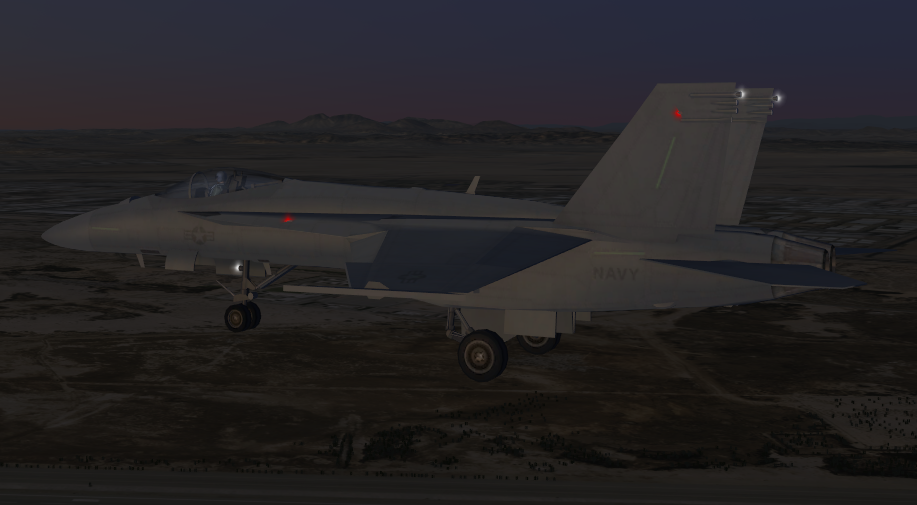
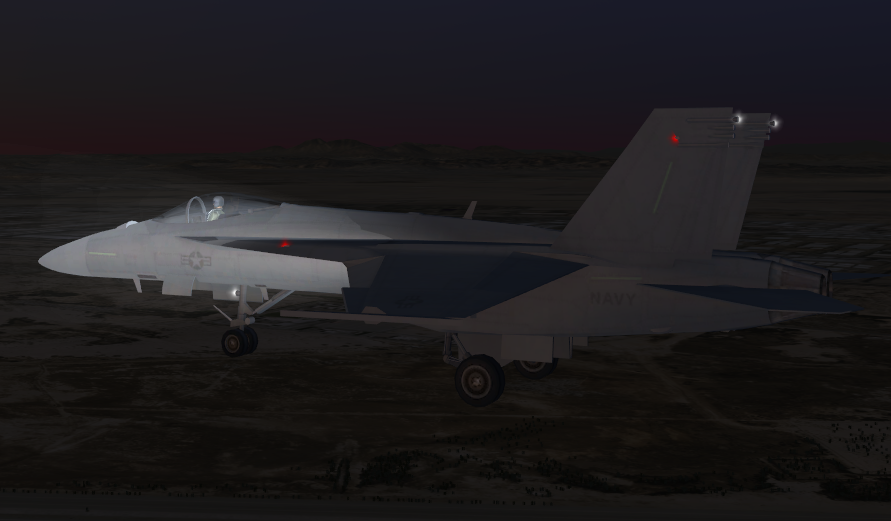
Place a air Target in the scene, move landing gear down and enable the lights
If using AeHost:
This scenario assumes the user is loading up the F_18E_SUPER_HORNET_usn model described in the target file snippet above.
If using AeHost:
- Click on the Database section Global, under Region select Saudi Arabia.
- Under positions select the 0412_AUTOGEN_OEJF_KING_FAISAL_NB predefined position.
- On the Targets section under Target Creation select Air Target, then select 4 and click Create.
- This will add the aircraft model to the scene.
- Go to the camera tab. Click Target Stealth Camera. Under Manual Camera Controls change the Horizontal, Vertical Offset and Distance until you are slightly above and to the side of the model.
- Go to the Ephemeris tab and adjust the Time to make it somewhat dark.
- Click on the Visual Model and Special Effects tab within the Targets section. Select the Landing Gear check box, Model Lights and Searchlight check boxes. You will see the landing gear come down and the lights come on.
- Lower down in the Visual Model and Special Effects tab under Ordinance you can choose Shoot Ordinance, Shoot Tracer, Shoot Flare, etc and watch them happen.
If using Spy
- Set mova_hv[0].type to 4
- Set mova_hv[0].position[0] to 21.355996
- Set mova_hv[0].position[1] to 39.169318
- Set mova_hv[0].position[2] to 1000.2712
- Set mova_hv[0].anticol_lts to 31
- Set mova_hv[0].anticol_bottom_lts to 31 and all the other _lts catagories to 31
- Set mova_hv[0].landing_gear to 1
Fixed Feature CIGI Packets
Entity Control Packet for Fixed Targets
| CIGI Packet Parameter | Value and Range | Nova Variable Mapping |
|---|---|---|
Entity ID | Host determined | N/A |
Entity Type | 0 - 999 | mova_hv[x].type |
Parent ID | Valid CIGI Entity ID | mova_hv[x].parent.type mova_hv[x].parent.id |
Roll | -180.0 - 180.0 | mova_hv[x].position.orient.roll |
Pitch | -90.0 - 90.0 | mova_hv[x].position.orient.pitch |
Yaw | 0.0 - 360.0 | mova_hv[x].position.orient.yaw |
Latitude / X Offset | Degrees if absolute Meters if parented | mova_hv[x].position.pos[0] |
Longitude / Y Offset | Degrees if absolute Meters if parented | mova_hv[x].position.pos[1] |
Altitude / Z Offset | Feet if absolute Meters if parented | mova_hv[x].position.pos[2] |
Component Control Packets for Fixed Targets
| Component Class | CigiCompCtrlV3 | ||
|---|---|---|---|
| CompID | Functionality Mapping | Description | Control Parameter |
| 0 | Damaged | Damaged state switch. Damaged state versions of each target must be defined in a damaged targets file. Each entry must correspond to the entries in the regular targets file. The damaged targets file is defined alongside the regular targets file with the token, "ConfigTgtsDestroy_File". | CompState: 0, 2 (Normal, Destroyed, Damaged) |
| 1 | Anticol_Lts | Anti-collision lights. | CompState: See Light Controls |
| 2 | Covert_Lts | NVG compatible lights. | CompState: 0 - 126 (Intensity) |
| 3 | Landing_Lobe | Landing light lobe. | CompState: See Light Controls |
| 4 | Landing_Gear | Lowers landing gear. | CompState: 0, 1 |
| 5 | Trail_Type | Turns on smoke/exhaust. | Not currently supported. |
| 6 | Muzzle_Flash | Automatic muzzle flash. | CompState: 0, 1 (Off, On) |
| 7 | Mslflsh[3] | CompState determines location of missile flash. Compdata[0] is the missile trigger (++). CompData[1] is the missile type. | CompState: 0 - 2 (Left, Center, Right) CompData[0]: As a float; missile trigger (++) CompData[1]: As a float; missile type See Missile Types. |
| 8 | Accum_Trail | Trail length and accumulation control. | CompData[0]: As a float |
| 9 | Plume | Afterburner plume power. | CompData[0]: As a float |
| 10 | Position_Tail_Lts | Position tail lights. | CompState: See Light Controls |
| 11 | Position_Wing_Lts | Position wing lights. | CompState: See Light Controls |
| 12 | Conform | Ground conformity. | CompState: 0 - 1 (Off, On) |
| 13 | Anticol_Bottom_Lts | Anti-collision bottom lights. | CompState: See Light Controls |
| 14 | Strobe_Lts | Strobe lights. | CompState: See Light Controls |
| 15 | Formation_Lts | Formation lights. | CompState: See Light Controls |
| 16 | Generic1_Lts | Controls first group of generic lights. | CompState: See Light Controls |
| 17 | Generic2_Lts | Controls second group of generic lights. | CompState: See Light Controls |
| 18 | Update_Mode | Enables host control or hooking up to a scripted sequence. | CompState: 0, 10 0 = Host Control 10 = Scripted |
| 19 | Collide_Mode | A bitfield specifying what objects the cable should collide with. | CompData[0]: As unsigned short (GetUShortCompData(0, CigiBaseCompCtrl::LSHW)) 0 = None 1 = Terrain 2 = Cultural 4 = Air Targets 8 = Sea Targets 16 = Ground Targets 32 = Weapon Targets 64 = Sling Load 128 = Ground Actor 256 = Cable |
| 20 | Self_Heating | Enables the host to specify if the model's IR signature should be hot, controlled automatically, or manually specified. | CompState: (Mode) 0 = HOT 1 = Manual 2 = Auto CompData[0]: As a float In MANUAL mode, 0 - 1.0 limits temperature on the range of (ambient, max) |
| 21 | Parent.Attachment_Point | Allows the user to optionally specify an attachment point on the parent model if supported. | Model Specific. |
| 22 | ID | Allows the user to optional set the nova ID for scripted sequences. | CompData[0]: As short (GetShortCompData(0, CigiBaseCompCtrl::LSHW)) |
| 23 | _pHost2Pcnova->h2atbos.air_targets[0].throttle_percent | Throttle percentage (0% to 100%). | CompData[0]: As a float 0.0 - 100.0 |
| _pHost2Pcnova->h2atbos.air_targets[0].total_thrust_body[0] | Body axis vector thrust X (+ East). | CompData[1]: As a float | |
| _pHost2Pcnova->h2atbos.air_targets[0].total_thrust_body[1] | Body axis vector thrust X (+ North). | CompData[2]: As a float | |
| _pHost2Pcnova->h2atbos.air_targets[0].total_thrust_body[2] | Body axis vector thrust X (+ Up). | CompData[3]: As a float | |
| 24 | Quality | Provides the capability to specify a preferred level of detail (LOD) for the target. | CompState: 0 = Medium 1 = High 2 = Low |
Fixed Feature FX Tuning
FX Tuning for Fixed Targets
No specific FX Tuning is available for air targets